↑ ViaPiaSantaCia
Page Created: 5/22/2026 Last Modified: 6/18/2026 Last Generated: 10/22/2026
The VIA, PIA, and Santa CIA
A Year of Trying to Copy My 40-Year-Old Commodore 1541 Floppies to a Linux PC
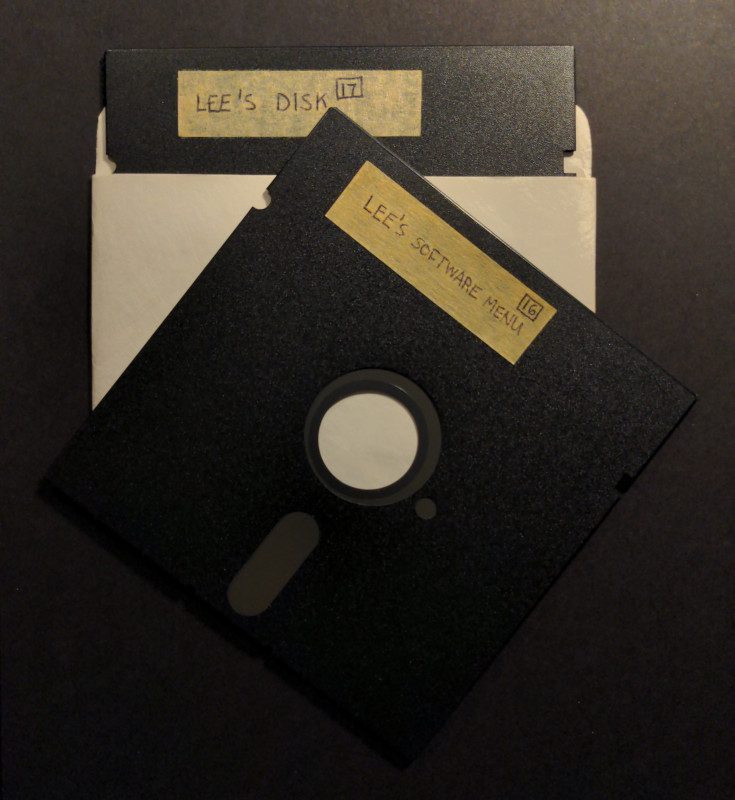
- Introduction: All Attempts Failed
- Narrowing Down to the Newtronics
- Banging My Head on DRM
- The Head Coil Corrosion Issue
- XoomFloppy 1.2 and Pi1541 Option A Was the Wrong Option
- Searching for an Old ALPS
- Unbricking My XoomFloppy
- Compiling OpenCBM and Running My First D64copy
- Head, Rails, or Alignment?
- The Copy-Protection Problem
- Soldering to the XoomFloppy Parallel Port
- Soldering to a 40-pin DIP Socket
- Cramming and Jumping the Jumpers
- Compiling Nibtools
- Another Failure, Another Day Dawns
- 1541 Parallel Paradise
- Modifying Nibread Source to Disable Head Bump
- The Slowest Floppy Drive Versus the Fastest
- Recounting the Cost-Cutting Lore
- VIA Shift Register's Broken Promise
- 1541 Serial Prejudice
- The Benchmarks are Astounding
- The Oxide Desert Past Track 35
- Zone Bit Recording
- Copy, Convert, Test, and Repeat
- The Art of Load and Start
- Transwarp: A Fastloader from Another Universe
- Woz Made His Drive with the Old Magic
- I Realized That I Already Built My Own “Disk Drive”
- What Was, What Could Have Been, and What Can Be
- Freespin: What is a Home Computer Anyway?
- The Language of the 8-Bit Bumble Bees
- Conclusion: The Joy of the Joseon Joystick
Introduction: All Attempts Failed
Beginning in February 2025, I wrote several gemlog posts on my new sister site at spartan://greatfractal.com that uses the Spartan protocol↗ (a wonderful Internet communication protocol lightweight enough to run on a Raspberry Pi Pico or even on a Commodore 64 connected to an ESP8266 for TCP/IP), about using a XoomFloppy, Pi1541, two Commodore 1541 floppy drives, and three Commodore 64s↗ (with a 4th in reserve) to try and retrieve data from my 40-year-old 5 1/4 inch C64 floppy disks. I even tried disks from different sources, but nothing worked.
Back in 2014, I published the source code for a couple of my C64 programs, my phone system and factorial generator, but they were scanned PDFs of my paper printouts (not necessarily the latest versions), and I also wanted to find the many other programs that I wrote as a teenager in the 1980s, such as my IBM 5181 Big Blue↗ thermal printer drivers, VHS video titler, fastboot menu software loader, robot arm controller, thermister reader, Jack-o'-lantern animation, and others. I spent around 8 years of my life (approximately 1985-1993) hunched over that 8-bit computer and 1541 disk drive↗ until I stored them away for good, only briefly taking them out once in the mid 1990s to connect my null-modem cable and RS-232 interface to the Amiga 500 so that I could upload my old wordprocessor papers using Novaterm.
But after unboxing them again in this third millennium and cleaning the heads of two previously-working 1541 drives, the drives would spin, but I would get "74 Drive Not Ready" errors using both OpenCBM + XoomFloppy↗ on a PC and using the original C64 computers themselves. I could proceed with formatting a disk, and both the spindle and stepper motors seemed to operate normally, but then after the format finished, it could not read it afterwards, which it should have been able to do even if it was out of alignment. I could even hear the stepper motor move as it switched tracks, and all seemed normal. But since those two drives resisted all of my attempts to read any disks, in March 2025, I gave up on this project for the time being and boxed it away again, worried that all of those flimsy, magnetic-media floppies, whose labels were now yellowed and crusted with age, did not survive into the 2020s...
But while I was upset to both lose my past work and waste so much time trying to recover that data, many people had reported that most of their floppy disks were still working, even after being in a hot attic, and I've had mine fastidiously enclosed in climate-controlled rooms and dust-free plastic boxes for 4 decades. The only thing I thought that might have been able to catastrophically erase them all at once was a large magnetic or electromagnetic field, and I did have both combined in an interior mag-mount ham radio antenna, set less than a meter from the boxes (a bad idea). I had placed my plastic boxes on the top of my bookshelf, out of the way so to not be disturbed, gathering dust over the years, but then, decades later, I also inadvertently placed my antenna up there, too, for better RF propagation, forgetting what I had sitting on the shelf next to them... But even so, other disks were in boxes at least 7 meters away and still could not be read, and I've never transmitted higher than 4 watts on any interior radiator. That inverse-square law tells me that this shouldn't nearly have been powerful enough to affect all of them.
Narrowing Down to the Newtronics
So there was one other reasonable possibility, that both of those previously-working 1541 drives that powered up and spun up, and that were confirmed working the last time they were stored away in a plastic bin in the mid 1990s, had suddenly gone bad. In the past, this assumption would have been unreasonable, as the solid-state board combined with working motor mechanisms in the 1541 drives simply go into stasis when you store them away. They were extremely reliable over hundreds of disks and (unfortunately) hundreds of hours (it was a slooooow drive when using its stock firmware), never once going out of alignment.
Hmm... "never once"... This is a curious clue based on what we know today, 40-years later. The 1541 tan-colored drives like mine with the brown, twist-to-lock front were improved versions of the older ones with the brown, push-down front, and the newer ones had Newtronics mechanisms inside that were more robust and did not go out of alignment as often as the earlier ones with the ALPS mechanism. So a quick investigation confirmed that these Newtronics ones are the ones I have. One of the reasons they switched mechanisms was that so many commercial games incorporated their own "copy-protection" schemes (what today we might call a physical version of DRM), and one of those many schemes was to intentionally introduce read errors onto the disk which broke the copier's ability to duplicate them exactly. So when the drive hits one of these read errors, it isn't confident where its R/W head is located anymore (a ferrite/coil that moves along two rails driven by a stepper motor) and tries to re-calibrate in case it was off-track, so it moves to the physical starting point again (the end stop just past track 1) before it steps back to the track it was on and tries again. It reminds me of the "dead-reckoning" code I added to my robot arm controller for that very C64, or even my more recent TRILLSAT-1 craft when it is in-between sensor readings.
Banging My Head on DRM
But wouldn't you know it, the designers were living on the edge like I was and did not incorporate an end sensor like today's 3D printers to let them know when that stepper actually reached the hardware limit, so they just slammed against that end stop to be sure and then would reset their track counter. It wasn't until the 1571 drive↗ was released for the Commodore 128↗ years later (a computer I also owned briefly) that they added an optical sensor for this, and strangely, with the even later 1541C for the Commodore 64C (the C64 series was still in production for almost another decade) which did indeed include an optical end sensor, it was disabled by default via hardware jumper (which can be re-enabled with some effort), so the head-banging continued! It's such a fond memory for us Commodorians that the VICE emulator even re-creates that sound if you want. I used to think that the slow 1541 was hard at work doing something when it made that noise, when in reality, it was like a blind taxi driver; it just doesn't know how far it needs to go to reach that stop past track 1, so to be sure, it assumes it is the farthest away that it could be and then attempts to move that entire distance. That's like someone driving a car into their garage but not knowing if the front of the car is still at the edge of the garage door or if they've fully pulled the car inside, and then thinking, "Just to be sure, I'm going to floor it for another 5 meters!" and then the car suddenly plows into the wall. As a side note, I have a memory of my father's car (a used 1970's Chevy or Cadillac sedan, I can't remember which) during those C64 years accidentally rolling off the top of some ramps when he was driving it up onto them to prepare to work underneath, the chrome bumper breaking through the drywall into our living room, but I digress...
To reiterate, so even if the head is close to the stop already, when the error occurs, it will slam against that stop multiple times as it tries to reach an imaginary point past that stop, causing that loud, iconic da-da-da-da-da machine gun sound. This technique is not unique to the 1541 drive, as even the Apple II drives would hit their end stop and make that noise (and they did it every time you booted up the computer, unlike the 1541 that decided on its own when to do it), but because the C64 had so many games with intentional errors, its stepper pulses were faster (with more kinetic energy) than Apple's, the drive internals remained hotter due to an internal power supply and lots of chips, unlike Apple's, that mechanism was punished constantly and could misalign and/or slip on its shaft. Apparently, the original designers did not take this into consideration in the older ALPS models, as who knew the market would abuse the drive in such a way? That's one of the many detrimental things about DRM, which still applies today. I still find it upsetting that more effort was spent in later years trying to restrict or penalize people from using their own computer hardware to run copies of other's software on their own disks than it was to fine or penalize those whose copy-protection schemes physically damaged the 1541 drive hardware of those that paid for authentic copies.
I won't expound further here, but as you can see I lived the history and still harbor resentment. For those unaware and were not there, it's a truly fascinating underground history topic to explore if you have the time, this 1980's, pre-DMCA arms race between those that created the complex, copy-protection schemes and the renegade cracking groups that broke those schemes and stopped that head-banging, but you won't find this in the official history books, only in the minds and stories of those former sneakernet surfers.
The Head Coil Corrosion Issue
But while these new 1541s had a more robust mechanism that could withstand such copy-protection abuse, they came with a fatal flaw that only surfaced decades later: the thin coils behind the heads on those Newtronics mechanisms were potted in a translucent sealing compound, but it allowed moisture in to slowly corrode those thin wires, eventually becoming an open-circuit after 30-40 years, and at the time of this writing, there is no practical way to replace or repair those heads, although you can open the drive and test the coils with a multimeter to confirm.
I read reports from people with stacks of Newtronics-based 1541s stating that the failure rate is massive, over 90% today, in many cases. Give it a few more years and we'll probably see close to a 100% failure rate. So back to what I was saying earlier: previously, it would be unreasonable to assume that two of my working drives (that had worked for most of decade) had suddenly failed while sitting in their climate-controlled box. It was not a bad electrolytic capacitor situation, either, so it was more reasonable at first for me to assume that those fragile, 40-year-old floppy disks had failed. But with this new information--that 90% plus drive failure rate due to corrosion--the opposite is now true. There was still hope left!
XoomFloppy 1.2 and Pi1541 Option A Was the Wrong Option
Before I read those reports, I couldn't believe that my drives or disks were bad and dismantled my XoomFloppy 1.2 device and resoldered some pads, thinking maybe it was a poor solder mask/reflow. Desperate, I then tried a non-standard firmware by editing the xum1541cfg source code to force a ZoomFloppy software flash of a different board, the PROMICRO version with a 7406 (since my board had a 7406), hoping it was just loaded with the wrong flash, which eventually bricked my board. Oh well, I wasn't too upset, for I'd rather sacrifice a modern device than some of those precious old ones. It was a cheaper version that did not have a parallel port, but at least it provided tiny solder pads on its PCB to expose this port in case I wanted to add it myself.
When that didn't work, I even bought and tried using a Pi1541↗ set as drive 9 daisy-chained to a real 1541 and real C64 along with a generic C64-A-V-Adapter attached to an S-Video-to-HDMI converter for high-quality output to my HDTV, so that I could try and copy disks over to it the conventional way, which didn't work on either 1541. Then I thought that perhaps the Pi1541 was malfunctioning, as it was the "Option A" model that was missing the 7406 logic inverter, so I could not use it to reliably daisy chain a real 1541 anyway, from what I later read. Now I couldn't tell whether the voltage was teetering on the edge of reliability without the Option B or whether the drive was bad, and I scraped-clean the pins on the serial cable, swapped C64s, swapped power supplies with one I even built long ago, properly grounded my AC, and even considered soldering in that logic chip before I scrapped this project in 2025. But, again, even a drive directly connected to a real Commodore 64 could not read any disks. I went through 3 real Commodore 64 hosts to obtain a high-enough sample size for my satisfaction, and gave up in trying a 4th.
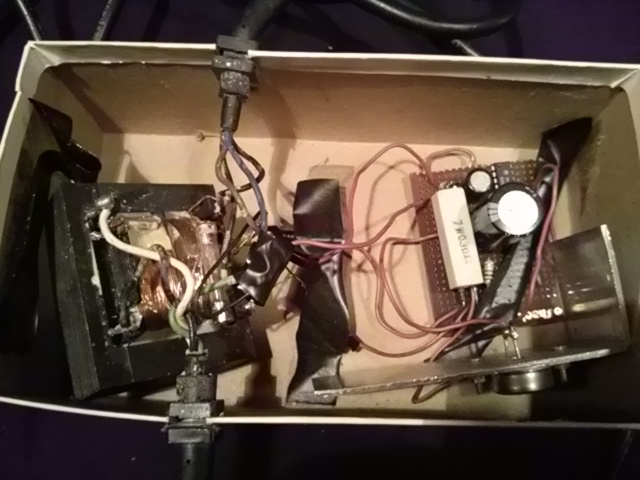
Well, in 2026, after reading those user reports, instead of going through the hassle of unpacking those drives again and opening up their cases to test the coils (which I would not be able to repair anyway), I went ahead and just ordered a used drive from someone on eBay, an earlier model with a push-down ALPS mechanism, one that was said to power on but was not tested.
Searching for an Old ALPS
You'll see a lot of old electronics like this out in the marketplace, marked as untested, which could mean just what it says, or it could mean that the seller knows it doesn't work but is hoping they can offload their hunk of non-working parts on you to cash out. It's like buying a used car; you have to look for many of the same signs. In this case, the seller had two drives, one marked with a black marker that had a large "8" and one marked "9", and they came with power cables, no serial. So I figured the fact that the seller had the set of two meant that they were unlikely to both have failed and had ended up in the same seller's hands (unless they were a clever scammer that marked them on purpose, but that would deface the drive), and the fact that they didn't have a stockpile of them improved those odds. Some sellers have stockpiles, which can be okay, but then you don't know which of the drives from the photo they will send you, and if the advertised model has many subtle variants, you may get the wrong style of 1541 (where they sneak in one of those lemon Newtronics 1541s with the bad heads). Also the 9 drive would typically get less use, usually only being dedicated as a second drive to speed copying, not subject to daily loading and abuse by those read errors like a drive 8 would. So I picked the 9, which meant that its internal jumper pad was cut by someone (as there is no simple switch to change the device number).
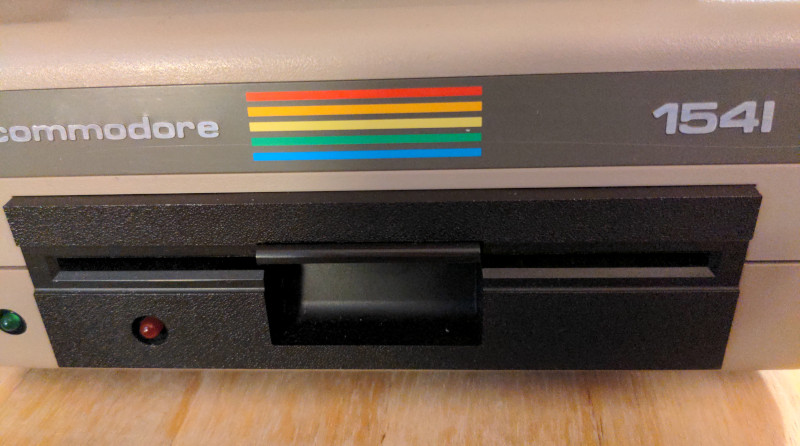
The front of the drive shows the brown push-down lever that confirms it is an earlier ALPS mechanism that was not prone to the Newtronics head coil corrosion:
Unbricking My XoomFloppy
But now that I had the drive, I needed that xum1541-based USB XoomFloppy again as it was the only reliable way of copying data off of that drive to a PC, unless I used the Option A Pi1541 and did a "read to memory, turn drive off, unplug drive, plug in Pi1541, turn drive on, write to disk" sort of routine which would put wear on the ports and risk frying my CIA chip. I do have that aforementioned RsTwoThreeTwo cable that I can modify to shift to 3.3 volt logic and cross-connect with the Pi GPIO UART port (like I did with that Amiga 500 at higher RS-232 voltages) to perform a modem terminal upload, but that will be slow and only work for files, not a copy-protected whole disk. But even with the whole disk, a working serial XoomFloppy cannot do reliable nibble-style copies for copy-protection unless I use a different drive model like a 1571 (these things are expensive and hard to obtain) or solder a parallel cable directly into one of the 1541's two MOS 6522 VIA chips. The Pi1541 could normally do it, but again, mine is Option A and can't daisy chain, a no-go. It's all just a bad combination of events because I purchased the less-expensive (and less featureful) versions of the devices, not knowing that I would need these obscure features in my particular situation.
It uses an 8-bit Microchip ATmega32U2 AVR microcontroller which is a 7mm x 7mm 32-pin TQFP surface-mount package, and this chip is tiny. I say that because, in order to unbrick it, I had to put that thing in DFU mode, AVR's Device Firmware Update, which requires grounding pin 13 and 24 on that tiny MCU and then release pin 24, all while it is plugged into USB. I had to rig up two DuPont-style jumper wires with pins that I grounded to the Pi GPIO, then while looking through my smartphone camera as a makeshift microscope, carefully perform this operation. It was poetically hairy at times because if I was off the width of a hair, I could short out the board or even short out the Pi. This inexpensive version does not have breakout pads for those pins, so I had to touch the pins on the minuscule MCU directly! Then it finally showed up in lsusb again and could be reprogrammed in Void Linux like so (as long as I had the firmware .hex file which can be obtained from the OpenCBM↗ project):
sudo usermod -aG plugdev <username> (then re-login)
lsusb (to make sure the device is recognized and ready to program)
sudo xbps-install dfu-programmer
sudo dfu-programmer atmega32u2 erase --force
sudo dfu-programmer atmega32u2 flash xum1541-ZOOMFLOPPY-v08.hex
These kinds of retro projects are their own adventure, as you have to piece together and compile software from multiple independent sources, often from old or defunct sites (and then figure out if the code has moved, is on the Wayback Machine, or has been forked). And the hardware to interface with it often comes from individual schematic designs, some open-sourced, and some independent people in various countries around the world building boards based on those designs. The Great World Wide Web ties all of this together so easily today, something we didn't have in those 8-bit days. In the age of hobby magazines and sneaker-level throughput, there would surely be many small projects that never got this type of exposure, lacking the resources or motivation to self-promote for publication, but now we're in the era of "build it and they will come". I came, since I came looking for that old nostalgia and my old software. Interestingly, some of my old software was those very text files that I downloaded from BBSes and saved as SEQ (Sequential) files to floppies using that old 1541 disk drive.
Compiling OpenCBM and Running My First D64copy
To compile OpenCBM to use that XoomFloppy to copy files and disks on Ubuntu 26.04, since I already had the linux-headers installed and did not need to install them again, it was just a matter of:
sudo apt install build-essential pkg-config cc65 ncurses-dev
git clone https://github.com/OpenCBM/OpenCBM
cd OpenCBM
make -f LINUX/Makefile opencbm plugin-xum1541
Then the install:
sudo make -f LINUX/Makefile install install-plugin-xum1541
Then I had to either move, symlink, or add to the path the cbm files it created in /usr/local/lib/ over to /usr/lib/
And after plugging in that old ALPS drive, it powered up as advertised, a good sign.
As a side note: when I compiled it on Void Linux in 2025, the CC65 compiler did not exist in the Void repos like it does for Ubuntu, so I had to compile it from scratch as well. This was a little more involved since I had to clone it from the github repo at https://github.com/cc65/cc65/. Then I had to put the binaries in /usr/local/bin and put the .cfg files in /usr/share/cc65/ and then set permissions to allow other read access. Then I had to perform an export CC65_HOME=/usr/share/cc65 before I compiled so the compiler could find those .cfg files.
Then after running "cbmctrl dir 9"...
...it listed a directory! Finally!
That means it successfully read track 18! After months of trying, Hallelujah! My old iron oxide disks were still good! My drive head is good! My XoomFloppy is good! My data was intact!
I immediately ran "d64copy 9 mydisk.d64" types of commands to copy the disks containing the programs I wrote as a teen four decades ago into .d64 files on Linux where they are now safe. It copied them fast, too, using fast-loader routines that are much faster than stock 1541. I'll piece them apart later, which I hope to publish someday.
Head, Rails, or Alignment?
But what next surprised me was that I got zero read errors.. at first. About 3 hours in, after copying multiple disks, I started seeing some errors, so I thought I finally found some bad disks (which is to be expected). But then I tried another, and got more errors, then another, and got more errors... Oh no. I tried one that I successfully copied before, and it now reported a significant amount of errors. At least I got my self-written programs off before it failed, but now I'm trying to preserve my old commercial utility and game software.
That's okay, I thought, as I never expected this drive to work completely, just that it gave me a good R/W head so that I can fix everything else, especially since I have two other drives I can now use for spare chips. At first, I figured it was a heat-related issue, that perhaps the heat made the head go out of alignment, and powered it down for hours until it cooled and tried again, but I got the same amount of large errors. Odd.
So I figured there were 3 possibilities: the head was dirty, the rails were gummed up and sticky, or the drive was misaligned. The first two are easy fixes, but the third is a bit more complex yet also fixable, and that earlier ALPS model is known to go out of alignment quickly, especially when it gets hot (which, as mentioned, is one reason why they changed their mechanism in the first place). But again, I'm using a drive with the internal jumper cut to serve as drive 9, that I assumed worked in tandem with drive 8, and drive 8 would have taken all of the abuse, with drive 9 probably being delegated to a write-only drive that didn't go through all of that head-banging. I was also just copying files that had no copy protection and didn't cause that banging sound, so I wasn't adding additional wear. So why would it suddenly go out of alignment on its own?
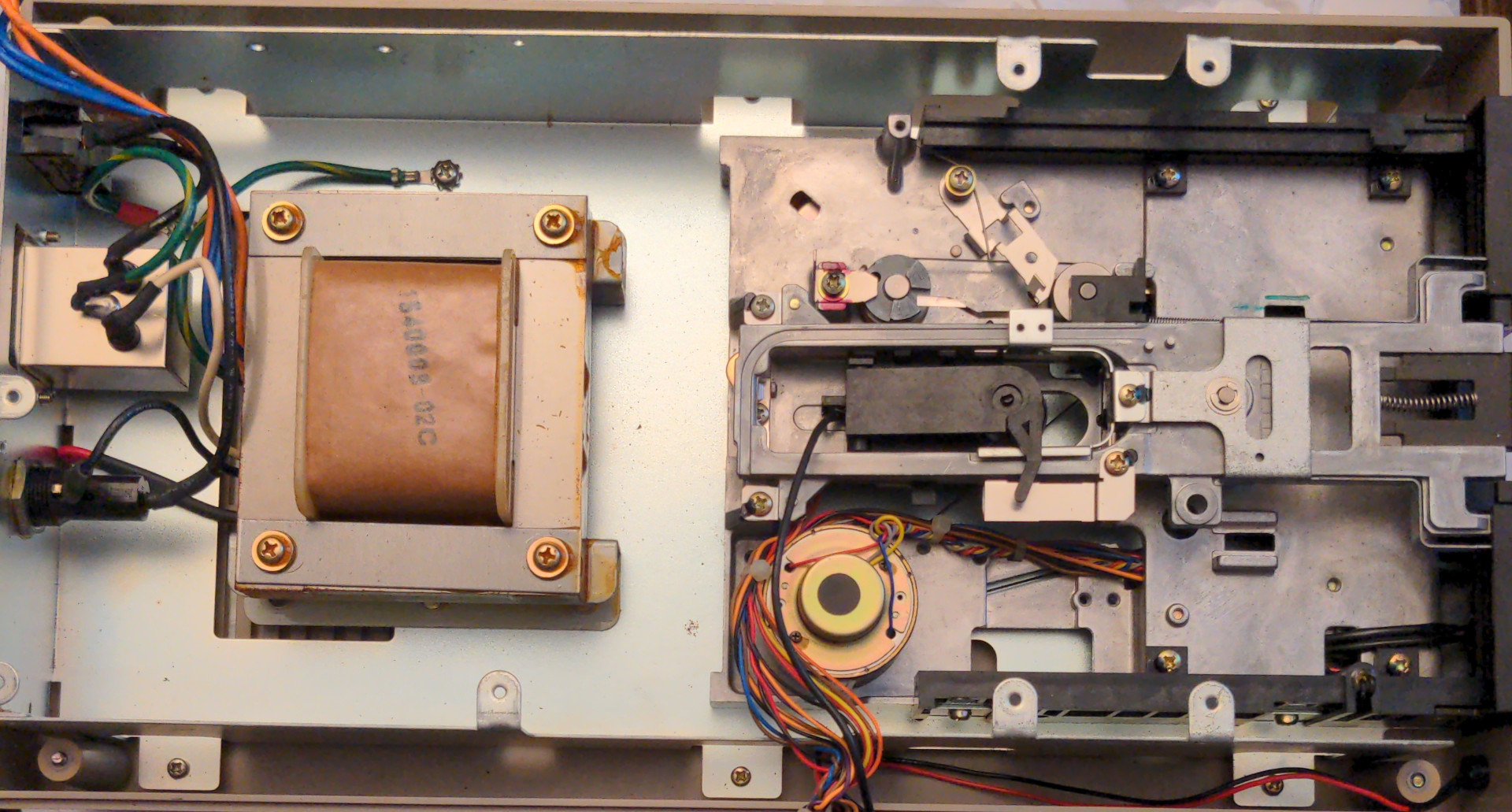
I opened the case (being careful to unplug the AC from the unit first and not touch the high-voltage leads of the switch or transformer), removed the top circuit board, and decided to clean the head with isopropyl alcohol (but the head looked fine) and then cleaned and re-lubricated the head rails with white lithium grease (and the head was indeed harder to move on those rails until I added the grease, a good sign). I also cleaned the spindle mount in case it was slipping and added grease to its axle. After putting it back together, it worked perfectly.
Again, for a while...
In some cases a specific 256-byte "block" (the data stored on a single 1541 disk sector) would error in d64copy, and I found that I could add an "-r 10" and/or "-t original" parameter to the line to increase the re-reads and also slow the drive down and use the original firmware, respectively, and it would then read the disk perfectly.
But in other cases, I got that real head-banging error, and once this happened and I switched to another disk, I'd get a slight click when first copying that disk with d64copy which implies it is not perfectly aligned and can't find track 1, so it bangs the head briefly. It then reads the first few tracks fine before the errors start to pile up. Then, every disk I try afterward also has lots of errors, even though they read perfectly before. So it acted just like it did before I cleaned those rails.
But then I found that if I use a known good disk and use the "-t original" parameter and allow it to complete past track 35 with no errors, I can often then do a d64copy afterwards with its fast-load routine with no issues, as if it reset the tracking and counters in software. But this did not work all of the time, and sometimes I had to do a d64copy with no disk in the drive to force the head-banging (and some of the bangs softened in loudness later) before either would work reliably again. I've tried "cbmctrl reset" and "cbmctrl status 9" and "cbmctrl command 9 I" (to initialize the head), turning the drive power off for 15 seconds to allow the capacitors to discharge and clear the ICs, unplugging and plugging in the XoomFloppy USB again, but none would reliably fix the issue like the pattern I mentioned above.
So my assumption is that either the head-banging is bouncing the head too far away sometimes (which my grease addition could have exacerbated) which could explain why it got quieter when the stepper finally got closer to the stop near the end of the banging sequence, or that the shaft is slipping on the mechanism, going out of alignment (which I read is common). This second theory would explain why it quiets down a little, too, since a shaft slip would alter the stepper phase and thus the distance to the end stop.
Near the top middle of the photo above you can see the round, grey wheel with two lugs that hits the end stop and makes that iconic sound--the silver-colored shaft in the center of that wheel is what may be slipping and taking it out of alignment. I'm pretty sure this is what is happening. But the fact that it still reads the disk at all is odd, since I would expect the read issues to be worse and not auto-correct themselves, but who knows. I can always perform a manual alignment and then lock it down but don't need to try that yet. I did look up how often a good read in d64copy could actually be a false positive, if an error could slip past the error-checking and correction mechanisms, which was also common in those 8-bit days using modems and disk drives since they relied on primitive checksums and GCR↗, but the combination of GCR and the XOR checksum routine in the 1541 ROM makes it extremely unlikely. It's more likely that the error would form after a successful copy (and later degradation) in which case one might only find out in the middle of playing a game when it hits that routine in the machine language address space and locks up. So you have to test your copies to be sure, or else risk losing a small percent of your data. So don't throw those old floppies away just yet!
Curiously, when I was a teenager, I remember other kids or their fathers talking about realigning their drives, as if they were constantly problematic. I never had any such issues with mine, as I had that newer Newtronics, being late to the C64 party (I first got mine near the start of 1985 at age 15, if I remember correctly) and they likely had the older ALPS. This ALPS is finicky, yes, but it's a predictable and fixable finicky, like a 3D printer that you can repair and keep running.
The Copy-Protection Problem
Now it was time to start on my pile of copy-protected disks. In the 1980s, I used a large number of nibblers↗, disk-copying programs that attempted to copy those complex copy-protection schemes verbatim, but none were 100% reliable until I found the pinnacle of all copiers, Fast Hack'em by Basement Boys Software. This thing was light-years ahead, had fast-load ability, parameters for multiple titles, and could even be completely loaded into the drive memory, and two drives could copy the disk without the C64 plugged in at all (the 1541s contained their own 1 MHz MOS 6502 CPU↗, internally, each just as fast as the C64 itself). There may have been less than 1% of disks that it could not copy, in my experience. Prior to Fast Hack'em, I used programs like the less effective Mr. Nibble which sometimes took around 45 minutes for me to copy a disk using a single drive (over 15 times slower), and even then, the copy would often not work.
But, again, XoomFloppy serial can't do nibble copies on a 1541 unless I solder that parallel cable between it and the VIA 6522 chip inside the drive, essentially performing a direct blood transfusion between both devices. I can boot up that old Fast Hack'em 4.1a on a real C64 and try to copy to a Pi1541, but I don't have that chip for the proper logic levels, and even if I did, this would be an unnecessary hassle. Really, I'd like to just use that Pi1541 for storing my disks on MicroSD that I can then plug into a real C64 when I want to use a real one, but in most cases I'll stick with the VICE emulator to take the wear and tear off of my old equipment. I've drooled over that new C64 Ultimate↗ modern FPGA-based computer with ZIF sockets for optional real MOS 6581 SID chips↗ but cannot justify the cost (which is technically cheaper than a C64 + 1541 drive were back then, even adjusted for today's inflation), although it continues to impress me.
Soldering to the XoomFloppy Parallel Port
So I attempted to solder that parallel bus between my small XoomFloppy 1.2 board and the serial Commodore 1541 (ALPS mechanism) 5 1/4 inch floppy disk drive. It took me about 4 hours in the vampiric pre-dawn under woefully-dim lamplight to complete due to the tiny size of the soldering points and the routing of wires underneath the socket and through the case in a non-destructive manner.
After removing the top cover again, it is visibly recognized as a short board version of the 1541 (there were many board changes for this drive) and has markings PCB no. 1540050 Rev C W-1894HB, 1982, Made in Japan. Here you can see the 1 Mhz MOS 6502 CPU, the two MOS 6522 VIAs, and the custom MOS 325572 gate array configured as a motor controller. To their left are the two MOS 8K ROM chips and the Toshiba 2K RAM. On this particular board, it was the upper U3 VIA in the photo that I needed to tap into. To the middle right of the circuit board, you can also see the rightmost round, silver jumper pad J1 that was cut by someone to set it as device 9 which can be soldered back together if I want to make it 8 again.
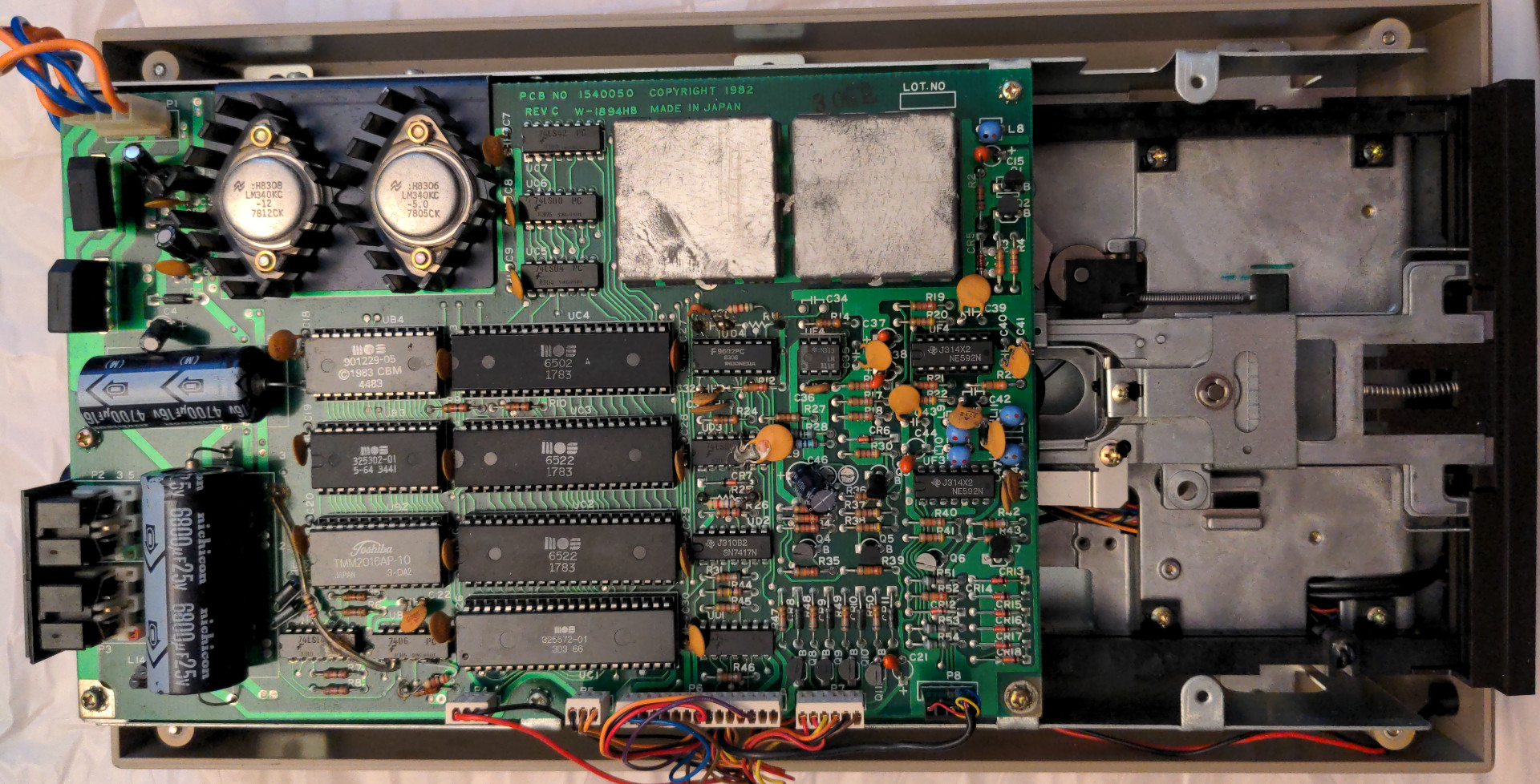
I had planned to do something like this useful 2010 page shows↗ but forgo the DB15 port in lieu of my DuPont-style jumpers (that I bought for my Raspberry Pi GPIO work) with color-coded wires. The XoomFloppy's B0 through B7 are pretty self explanatory and connect to the 6522's PA0 through PA7, but it appears that PC2 should go to CB1, and FLG2 should go to CA2. However, as I found out afterwards, the last two were not needed--more on this later.
After unscrewing and removing the XoomFloppy 1.2 board from its small case, the parallel port holes were so small and so close together that I had to use some old 1/4 watt resistor leads that I snipped off of some old resistors and first solder them to the pads, as shown here:
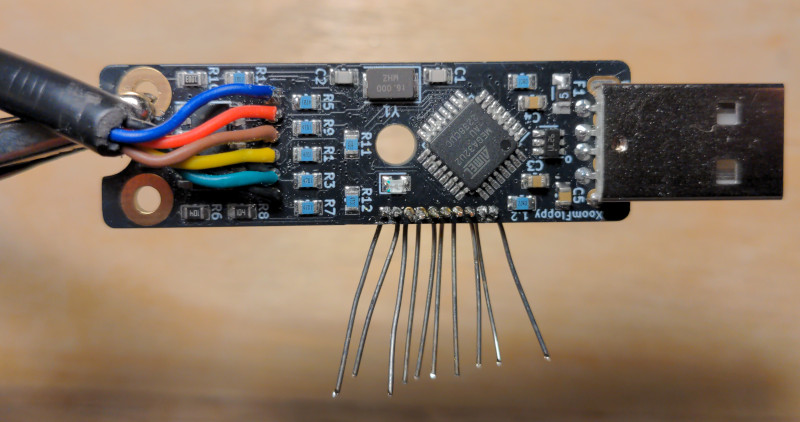
Then I had to cut off the ends, strip, and solder those colorful jumper wires (still mostly bound together in ribbon formation) to those leads, then test for continuity and no shorts with my multimeter and redo my soldering if I had bridged or cold solder joints (which happened a few times). This was the most difficult thing I've ever hand-soldered before, even more so than DeadPiAudio since they were so close together, difficult even when using my new soldering iron with its sharpest tip. When done, I had to then cut open the housing to allow those new parallel wires to pass, but the frosted, clear plastic was so brittle that when I tried to snip out a small side section with my wire snips (which usually works for most plastics), it was like a crack that shot out across a car windshield--the plastic disintegrated into something that resembled rock candy and flew everywhere.
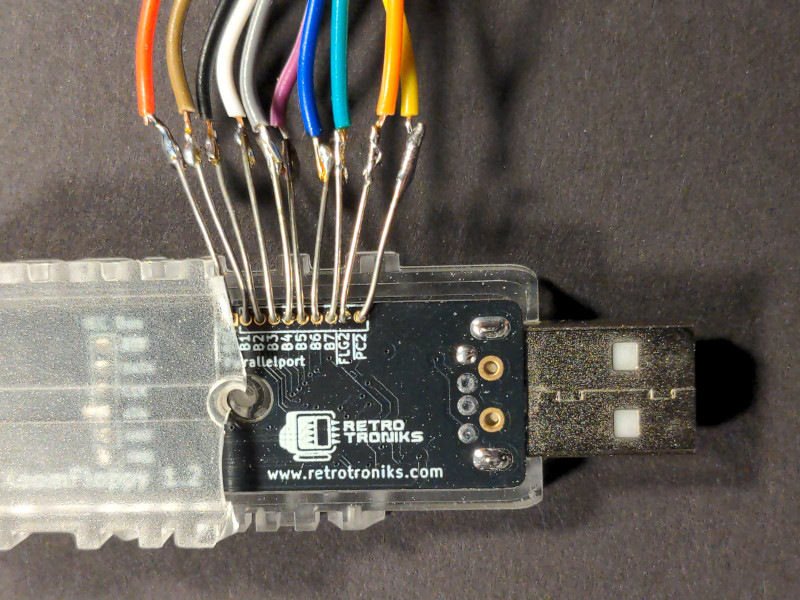
So afterwards, I decided to encapsulate the whole section in hot glue which suffices as a replacement for that missing section of the broken housing, as wire insulation, and as a strain relief, all in one. I don't care about the longevity of the device, a bad habit of mine (heck, this could also corrode in 30-40 years just like those head coils), as I just need to use it long enough to nibble-copy the rest of my Commodore 64 floppy disks to a modern Linux PC.
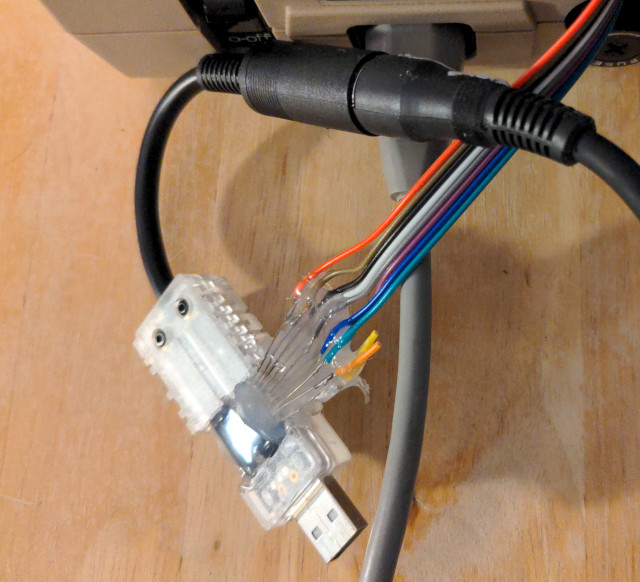
In retrospect, as you can see in the photos above, I soldered to the wrong side, the side without the port labels, which was a bad decision on my part as my solder blobs were then uncomfortably close to the MCU's surface-mount solder pads. Also, soldering to both sides would have mechanically stabilized the wires and reduced torque on the thin copper pads, but my tired self at 3 am didn't think of that nor want to draw this project out any longer. I was so worried the fragile solder joints would break free, but once I had hastily sealed it up with that hot glue, covering those labels, I was suddenly unsure if the soldered-side (which I was at least lucid enough to not glue) actually had an electrical connection, but it was too late to easily switch sides now. But luckily, a quick Internet search confirmed that it was "through-hole plated" so that neither side mattered. Whew. Let's get this thing done before sunrise...
Soldering to a 40-pin DIP Socket
On the 1541 side, I could now relax and reunite with my old electronic friend, the DIP↗, much larger and easier to solder. I had to cut and strip the ends of the jumper wires and solder them to my 40-pin DIP socket pins, the wider part of the pins near the socket and not the section that is meant to insert/piggyback into the 1541 MOS 6522 socket underneath.
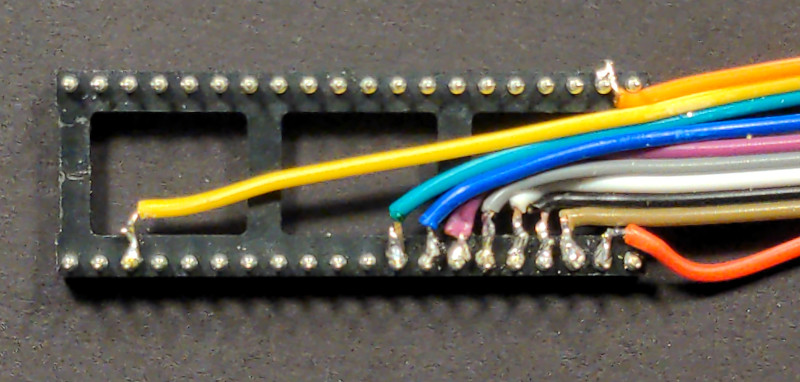
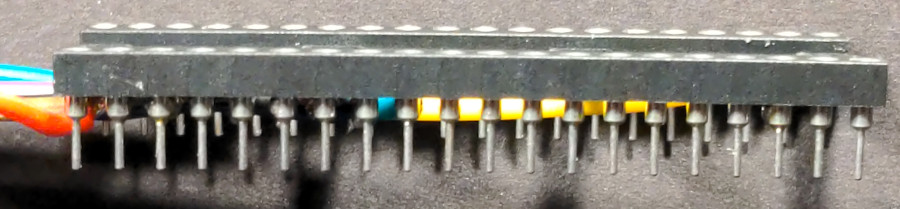
A week prior, I made sure to order a socket that had pins that flared up into a wider diameter at the top, like a cake-style ice cream cone, which doesn't interfere with the section that actually fits into the socket to allow enough of a gap for my 10 jumper wires to pass, as many sockets out there do not have this, and it needs to be a socket for round pins. Instead of clipping multimeter-style spring-hook clips to the DIP legs like some people have done, I used a Preci-Dip model 110-87-640-41-001101 from Digikey, and then soldered to that instead of risking the 40+ year old VIA. Here is a side view of those pins:
Cramming and Jumping the Jumpers
Even though I now had more room, my 10 DuPont-style jumper wires were thicker than I expected, and on this board, the 1541's ceramic capacitors are very close to the ends of the socket which added force and made it harder to line up the pins and insert them in place, so I had to cram the wires underneath and then bend them sharply at the edge of the DIP which put a lot of tension on those fragile solder joints. Right-angle bends are not good practice for both high-speed data lines and RF emission, but this carries low frequency/long wavelength, low-power signals, and the partial RF cage that will be reinstalled on top will block most of it. Nevertheless, it's a good idea to use a shielded cable along the full length. Those solder joints were fine when I tested them with the multimeter, but after installing that socket, all bets were off.
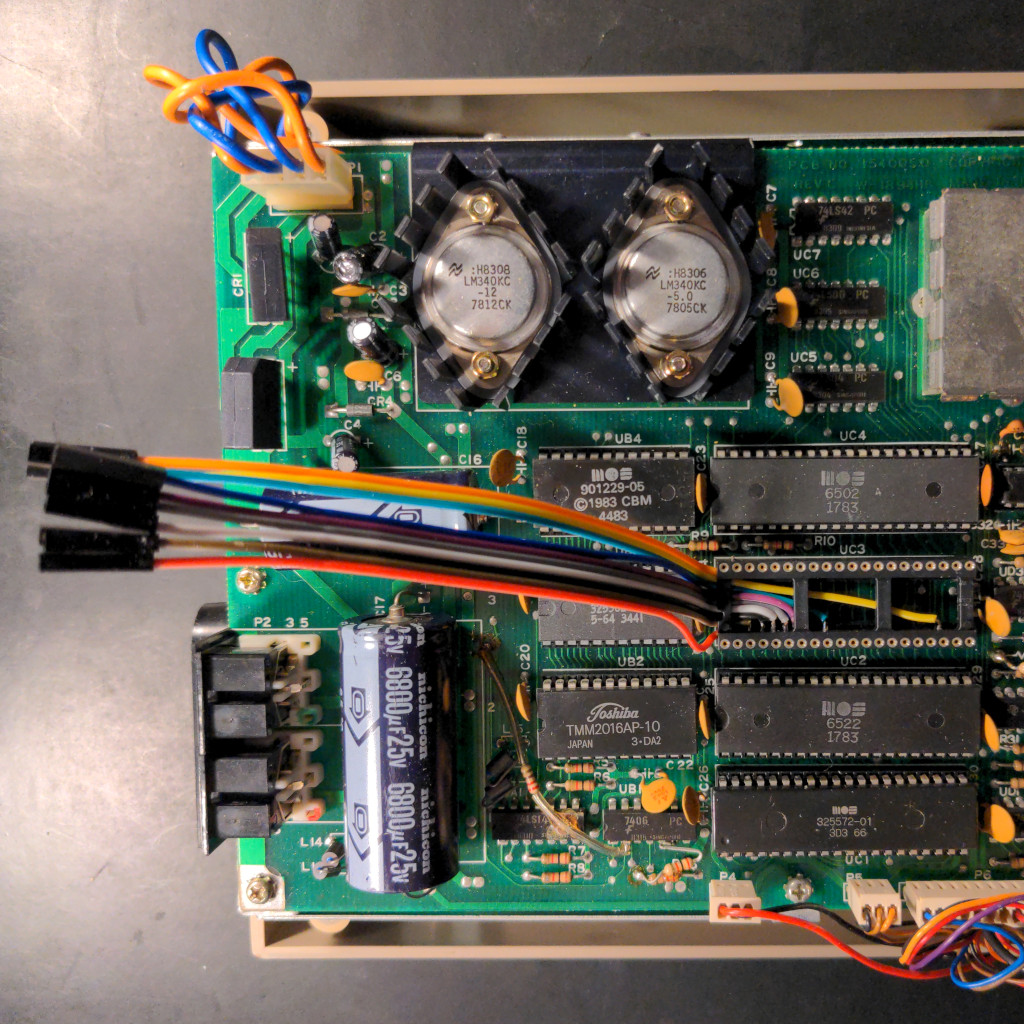
Then I reinstalled the 6522 into that socket.
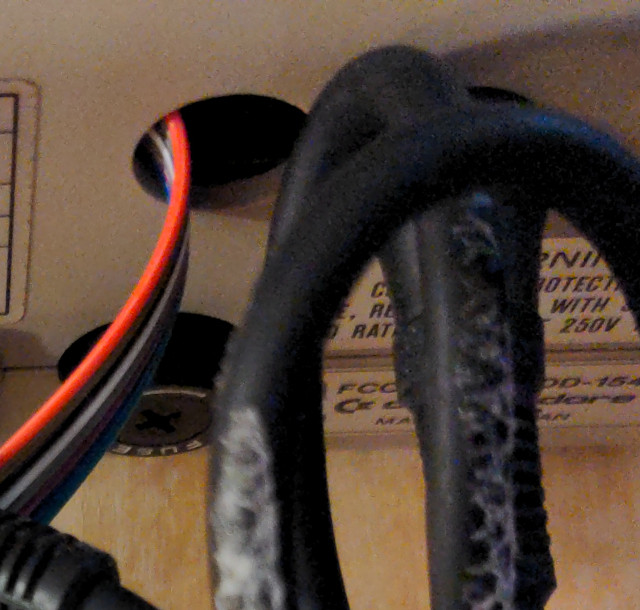
Now I finally had jumper wire pigtails properly installed on both sides, the XoomFloppy side and the 1541 side. The reason I separated them like this was to allow me to connect and disconnect the XoomFloppy device intact, with no modification to the case. Since the top cover vent holes were too narrow to allow the black jumper connectors to pass, the wires in the 1541 were instead routed over the internal power supply and barely pass through the gap at the two serial ports, which acts as a nice strain relief. They block the serial port when they exit, but since I only need one port in my setup (and there are two) they can block one without causing an issue. I can always disconnect it if I want to daisy-chain my Option A Pi1541 alongside it as long as I first convert it to Option B. My idea at first was to keep the jumper end connectors outside the case for easy access and quick connect/disconnect, but my jumper wires were not long enough and just barely exited the hole, all crammed around that serial port, difficult to see any wire colors, as you can see here:
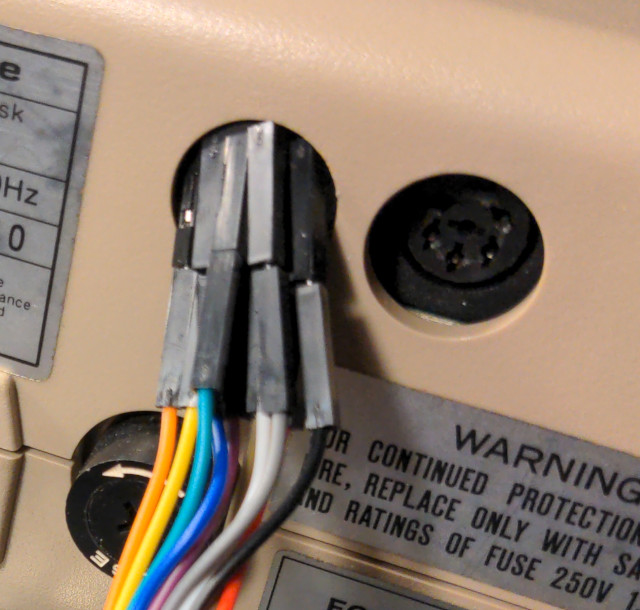
So later, I decided it was best to connect the jumpers while the drive case was open (a little less convenient) and then close the case afterwards and just let the colored wires run through as shown below. By the way, you can see the white polystyrene foam stuck to my serial cable's black outer sheath, something that occurred by simply keeping it safely stored away in its foam box for decades. Plastics do strange things over long spans of time.
Compiling Nibtools
After I reassembled everything, to test, I then had to compile the nibtools↗ package which was separate from its dependency OpenCBM but conveniently contains a mirror in its github subdirectory. Compilation was fairly simple, since OpenCBM was installed, and I already had everything set up for compiling OpenCBM and went something like this in Ubuntu 26.04:
git clone https://github.com/OpenCBM/nibtools
cd nibtools
make -f GNU/Makefile linux
Then in the nibtools directory, it creates nibconv, nibread, nibrepair, nibscan, nibsrqtest, and nibwrite executables. To make it easier for me to use and find in the path, I then copied them into my /usr/local/bin/ folder.
Another Failure, Another Day Dawns
Since my 1541 drive is device 9, not the usual device 8, I ran my first command, nibread -D9 mydisk.nib, but it did not work and errored out as if it could not detect the parallel port.
I also tried running d64copy 9 -t parallel mydisk.d64 and got similar errors (something I could have tried first before compiling nibtools). The d64copy program can also copy in parallel to increase speeds, but it isn't a nibbler like nibread.
Saddened, I went to sleep as the morning sun appeared, and the following afternoon I opened up the drive again to see what was going on. The 10 wires were so thick that when I inserted the socket into the other socket they forced the red wire loose and created an open-circuit. The Newtronics Curse was hard to break.
I also noticed that I mismatched the colors on 4 of my jumper wires. The curse had struck again. This was because, as mentioned earlier, I could not clearly see the wire colors when I connected them the night before until I later moved those jumper connections inside the case, where I had enough slack to do this, and reconnected them. Then I read that I didn't even need to add the FLG2 and PC2 lines for handshaking at all, so I snipped off the orange and yellow wires and then soldered the broken red wire back on, which now had more room to fit since it was just those 8 wires now (the new 8-bit parallel data bus). The reason those wires are no longer needed is because the handshaking and ground lines come from the serial port instead, which has to stay connected during use even during parallel transfers. So this pinout is a bit more accurate↗ in my case, although it does not show any photos.
Then I tested once more, and...
...it finally worked!
1541 Parallel Paradise
Not only does it work, it is magnificent, the fastest 1541 whole-disk copies I have ever witnessed--by a giant margin--in the 41+ years since I have owned a 1541 drive! This is even faster than d64copy serial was with its fastload routines (but nibread also copies copy-protected disks, too) and was faster than Fast Hack'em 4.1a (the latest version of the best copier I ever used) was with two drives. How fast is it? I'll keep you in suspense for now and provide the benchmarks later below, but let's just say that it can copy 35 tracks in the same time it took you to read this paragraph. Phenomenal.
It makes copying so effortless now that I should have waited until I soldered in the parallel adapter before trying to copy as many disks as I could using d64copy over serial, adding wear to the drive and disks as it spins longer, but I was worried the drive would fail before I got my most important data off.
Also, when I took the drive apart to install that parallel socket, I noticed that the drive head was dirty with oxide residue, likely adding to increased errors and rereads I encountered during those d64copy days. I had cleaned it before that d64copy session, but these old disks are adding more residue now, so I had to clean it again with isopropyl alcohol.
Modifying Nibread Source to Disable Head Bump
However, a big downside for me of the nibtools package and nibread is that they force a "head bump" before starting any copy, unlike d64copy, banging that head against the stop multiple times, and this is hard-coded into the software and cannot be disabled (although there is an interactive-mode workaround that I found out later). The author states that this is the only way to guarantee an optimal track adjustment to copy the protection schemes of many disks, but that would take an immense toll on my ALPS mechanism if it had to bump for each disk, throwing it out of alignment quickly, something I also explained in my last post. So at first, I tried to find a way to step to track 1 or track 35 using OpenCBM or nibtools before performing the nibread, to see if that reduced the impact by either traveling farther (and reducing the number of bumps) or butting up right up against the end stop (allowing the stepper to cycle but not bang as much) but could not come up with any good working commands. I was able to perform a d64copy -s 35 -e 35 -t parallel 9 dummy.d64 or a d64copy -s 1 -e 1 -t parallel 9 dummy.d64 to just move the head to either track 35 or track 1 and quickly copy a dummy file before I started a nibread, but this only worked if there were no errors on those tracks to begin with, and it still violently impacted the end stop from any starting track anyway, and I believe this is because the number of stepper pulses is twice as much as the number of tracks, causing more left over head bumps than one would expect. So I decided to modify the C source of nibread.c to disable the head bump entirely.
There is a line in nibread.c that says:
bump = 1; /* failing to bump sometimes give us wrong tracks on heavily protected disks */
If you change it to 0 to disable the head bump, then recompile as mentioned above, it will easily remove the mandatory bump. This is a prime example of the benefit of open-source software, the ability to modify program behavior yourself. Once I recompiled, I copied this over as /usr/local/bin/nibread2 so I had 2 versions to choose from, stock nibread with the bump, and my modified nibread2 without.
I then copied numerous disks with the head bump disabled, and they copied the copy-protection perfectly, only trying the head bump if that didn't work, but I never found a case where the head bump was necessary. Maybe this was because I did do an occasional stock nibread head bump when I ran into a heavily-errored disk that would not work, so it never had a chance to veer off track much. And removing the head bump saves another 3 seconds. It was extremely fast, but I didn't realize until later the the -I interactive mode disables the head bump most of the time for all copies after the first one, and has other benefits, too.
The Slowest Floppy Drive Versus the Fastest
Nevertheless, my experience reveals what a lot of us Commodorians had suspected already, that the infamously-slow and serial 1541 was like a shy genius that reluctantly tagged along with its extremely-popular C64 friend, a fast floppy disk drive with its own brain that never got a chance to show the world what it could actually do. While the Commodore 64 is known as the best-selling computer of all time, its stock 1541 disk drive was the slowest 5 1/4 inch floppy disk drive of all time as well!
The fastest 5 1/4 inch floppy drive sold in the US at that time for 6502-based home computers, by a large margin, was the parallel Apple Disk II↗ created by Steve Wozniak↗, who was also said to be quite shy compared to Jobs, and his fast and low-cost FM-free design is often heralded as genius. But it wasn't Commodore's decision to use the serial interface that slowed the 1541 down per se; it was primarily the poor software firmware (ROM) at the time, in part to remain compatible with the 1540 of the VIC-20 and keep most of its ROM routines; but don't blame the VIC-20 either, as Commodore never wanted it to be that way. This is why there were so many 3rd-party fastloaders programmed for the C64 to allow it to bypass those ROM routines and provide immense increases in throughput, although even those at the time still could not match Wozniak's masterpiece (as Apple had switched to ProDOS in 1983 which took more advantage of its speed). Interestingly, hardware-wise, the 1540 is essentially just a standard, 300 RPM floppy drive mechanism of that time (similar to Apple's--Apple even later switched to the same ALPS mechanism as the 1540/1541) built into a dedicated VIC-20-like board (i.e. it shares most of the same chips but without about half the RAM and the VIC graphics/sound chip). So it's no wonder that the 1540 was more expensive than the VIC-20 itself, and in later years the C64, too, also cost less than its 1541 drive, the 1540's successor.
Getting curious for more lore? I was, too! I've read a few sources (mostly secondary, as primary ones are surprisingly hard to find using casual web searches) and compiled my own narrative which is hopefully somewhat accurate, but my numerical figures throughout have not been rigorously examined (any many are likely in error), which is out of scope for this project page. It's much more difficult to write in detail about someone else's work than to blog about your own (like I mostly do on this site), since you're no longer the primary source nor can you accurately understand what they thought, did, or tried to do (and why) but have to use your best judgment and reasoning based on the material you can find. I purposely do not cite my sources, but I do often provide occasional hyperlinks to facilitate the narrative, which can sometimes serve a similar purpose.
The old computer magazines and hardware manuals of the time have some great information, too, if you can find them. At the time of this writing in 2026, Internet search engine AI results are horrendously inaccurate, and narrative-style LLMs will confidently report all kinds of facts that are completely wrong and didn't happen, fabricating plausible fictional stories in prolific technical detail to fill the gap, which really makes me worry about future generations (or even those of us with fading memories) not having access to historical data. The home computer era is still in living memory for me, yet I was only a teen at the time and, although I read and had computer magazines, was not privy to the machinations of these 8-bit computer companies. There are some 8-bit hardware web sites and Youtubers out there, many around my age, that have done a pretty good job covering the basics, but even they make errors and have a hard time finding specific information, and some also link to even older interviews in the 1990s or early 2000s after the 8-bit era had passed. It's as if you just uncovered some Ancient Greek writings only to find that they were retelling a story from earlier Babylonia or Atlantis... It's a bit eerie and depressing to see this happen in one's lifetime when many of our Homeric heroes are still alive but lost in an sea of electronic noise. As I write this in June 2026, Christopher Nolan is set to release his epic film The Odyssey, whose namesake comes from one of our oldest stories ...whose name was used for one of our oldest video game systems↗.
Recounting the Cost-Cutting Lore
As the lore goes, the 1540 was a serial drive created to cut costs for the 1980's consumer home computer market, unlike the earlier parallel 2031 for the Commodore PET, but besides their decision to use serial, they also cut costs on both the 1540 and 2031 by not using a hardware GCR chip, a chip they used in the even earlier 2040. So the VIC's 6502 CPU had to do this in software, which was one thing that slowed it down.
Wozniak also did his GCR in software to cut costs and chip count, but his real-time finite state machine method in 1978 was more efficient and better-matched to the 6502 (it wasn't until 2013 that Lft of the C64 demoscene found a way to do this on the 1541↗ ). It seems somewhat strange today in an era of smartphones and robotics with plentiful sensors, MCUs, and actuators of all sorts to consider that chips and sensors used in past floppy drives were removed for cost reasons to bring them down to consumer levels, so they had to develop novel methods of handling the same things, maxing out what they had. For instance, that little index hole you see in those floppy disks for tracking the rotation--those were not used in any home computers that I encountered and were mainly a relic of 1970's design like the Heathkits. I grew up with a Heathkit↗ retail store next to be, only visiting it once as a teen since it was strange and archaic, their kits at that time being more expensive than pre-assembled computers, perhaps analogous to what younger people today might experience with 3D printers versus older RepRap kits like mine. I was to those Heathkits as the later Mac/PC kids were to our earlier 8-bit home computers.
But I'm not talking about that write-protect notch or using a hole puncher to create one so you could use the other side of a "single-sided" disk; I'm talking about that curious round hole in both the spinning media and plastic shell that come into alignment once per rotation, the ignoring of which made using the other side possible in the first place (and doubled-capacity, a wonderful bonus). Since they didn't use that index hole, they didn't need optical sensors to track it and used what is called "soft sectoring" instead. And both the Apple Disk II and Commodore 1540/1541 eliminated optical end sensors, too, and just did those mechanical head bumps/bangs to find the first track by touch instead of sight; robotic eyes were a luxury.
Those little parts were very advanced and useful, but they added cost and were not absolutely necessary. In a way, this is also perhaps analogous to low-cost electronics from China in the 2010s and 2020s in which the designers often found creative, unconventional (and often worrisome) ways to remove parts but still roughly achieve the same function, often with a reduction in capability or quality that matches the reduction in cost (a relationship which indeed has beneficial use cases). Woz, by the way, removed parts and increased capability. As mentioned above, that's the reason Commodore switched to serial, too, as those IEEE 488↗ parallel cables and connectors were more expensive, although there was an odd VIC-20 cartridge that did provide an IEEE 488 port if one wanted to use older PET drives.
According to the 1984 book The Home Computer Wars: An Insider's Account of Commodore and Jack Tramiel by Michael S. Tomczyk (who worked at Commodore as Tramiel's assistant), Tramiel, the CEO of Commodore at the time, once said to him at the 1980 Consumer Electronics Show in Chicago:
"We have to be a mass-market company. I want to bring down the price of computers, like we did with calculators. It means we have to sell more volume and make less money. But we're spoiled. We have to learn to live on a diet. We have to sell to the masses, not the classes!"
I wouldn't have had a computer career if it wasn't for this type of cost-reduction for the masses. My neighbor's Apple II+, while cheaper than the predecessors of the 1970s, was still very expensive, way outside of my family's budget. If I remember correctly, when I got the Commodore 64 and 1541 disk drive in early 1985 at our local Target discount store in Bridgeton, Missouri, a suburb of Saint Louis, they were $150 each, $300 in total (equivalent to over $900 in 2026), when the equivalent Apple IIe system (with less powerful gaming sound and graphics) would have been close to $1500 (over $4,500 in 2026), and the 16/32-bit 128K B&W Macintosh around $2500 (over $7,500 in 2026), IBMs even higher. So like the Raspberry Pi series of the 2010s-2020s, I very much appreciate the mass-production, the work of those early hardware engineers, and the invention and incorporation of BASIC, which combined, were a great equalizer.
Coincidentally, as I completed this article on the night of June 12th, 2026, the same day Steven Spielberg released his 37th film, Disclosure Day, a director that also directed a 2018 film that has computer cameos and makes nostalgic references to early home computers including the C64↗, the world news has also reported that the world's richest space, electric car, and media mogul has just become the first trillionaire↗, a million million (plus an extra 100 billion they estimate), a grotesque income disparity of the highest degree. Ironically, he once grew up in a simpler time when he learned how to program in BASIC on his first computer (for the masses) when he was 10, stating on March 16th, 2026, "There is special place I my heart for the C64 and especially VIC-20, my first ever computer. I stayed up for 3 days programming nonstop when I got it for the sheer love of coding."
Rosebud is to Charles Foster Kane↗ as those 8-bit home computers were to many of us kids of the eighties, all around the world.
VIA Shift Register's Broken Promise
Since the 1540 (and 1541) were serial drives that needed bits serialized and de-serialized to pass over the bus, unlike Woz's parallel drives, instead of again relying on the 6502 to do this in software (like they already did for GCR) which would slow down the transfer immensely, Commodore engineers had the foresight and intention of using the hardware shift register on the new MOS 6522 VIA↗ to do this on both the 1540 and the VIC-20 (both ends of the serial bus). In other words, they were still wanting to implement some form of hardware-acceleration for their serial setup. In retrospect, it's kind of ironic, as modern day Apple is all about minimal serial cables and thin wires (and wireless), "form over function" many would argue, but now that hulking, serial 1540 and 1541 look rather minimalist and modern compared to the mass of parallel ribbon cables you'd see coming out of some of those home computers at the time, and you just plugged it in--no drive controller card or interface needed. Heck, the long, tan case even looks somewhat like a later Apple DuoDisk (which has the same ALPS mechanisms inside) which used a round cable instead. And the 1540/1541 both contained their own CPUs which also seems modern, as the majority of electrical devices today now have some sort of CPU or MCU inside, but back then this would have been far less common and far more expensive. Even today, EIDE PATA PC drive cables are seen as barbaric compared to SATA or eSATA.
Well the Commodore engineers such as Bob Russell could not get the 6522 VIA hardware serialization scheme working in time since they kept running into apparent bugs, so they had to do what they didn't want to do, use the 6502 CPU to perform this in software which slowed it down immensely, especially since the code wasn't optimized since it just replaced the shift-register but did not take advantage of the fact that it was no longer bound by that hardware design anymore. This is fascinating to me, since Bob also bit-banged that serial UART in their user port via his kernal (the C64 kernel) software, the one I built my RS-232 interface around to drive an IBM Big Blue printer. They worked those 1 MHz 6502/6510 CPUs hard!
Later it was found that there really was a hardware bug↗ in the 6522 shift register, which worked fine if two VIAs shared clock signals, but not if they were separated by that serial bus... Ha! Well, for the next-gen C64 and 1541, Bob was going to try this again using the bug-free shift-registers on the newer MOS 6526 CIA↗ (two famous chips in the C64) instead of the older 6522, but the PCB circuit traces it needed were inadvertently removed from the mainboard by production engineering, creating thousands of boards like this before he found out and was then informed it was too late to change! So they had to keep those VIAs and keep those slow software routines. This was not as big of a problem with the VIC-20, since in-memory programs were no larger than 5K in the first place, but the C64 had over 12x more RAM to fill. And all of these reasons (slower software GCR, slower and unintentional software serial, larger load requirements) contributes to why the 1541 using the stock ROM is so slow.
To add insult to injury, he then had to modify the ROM and kernal to get the drive to work with the different timing of the C64, since the C64 lost some CPU cycles to its VIC-II chip (known as "bad lines"), and this made the 1541 drive on the C64 even slower than the 1540 drive on the VIC-20! So the 1540 and 1541 are not just compatible; internally, they're the exact same drive, except for a small part of the ROM software that alters this timing. This makes the 1541 compatible with the VIC-20, but the 1540 is not compatible with the C64 unless you ether change that old ROM (which turns it into a 1541) or temporarily turn off the VIC-II chip with a custom POKE command to the right memory address to blank the screen during loading, and then enter another POKE to turn it back on afterwards, which may be difficult to type in if you can't see the screen.
The reason I said above that those fastloaders were "for the C64" instead of for the 1541 is because half of the fastload program actually runs on the C64, and then the C64 would essentially perform Serial In-system Programming (like a modern MCU today that uses serial SPI↗ to program its flash) over the serial bus to the 1541, temporarily overwriting its core program to run the other half (in RAM, of course, since it does not have an EEPROM and there was no flash memory back then, either).
This is actually very easy to do from C64 BASIC to send Block Memory strings to the 1541, and even my 1985 book Programming the Commodore 64: The Definitive Guide by Raeto Collin West mentions this in the chapter "Using Disk Storage". As most C64 power users will recall, this drive was not a typical dumb drive like the Apple Disk II that had to be paired with a disk controller card, where the host computer booted up some form of DOS. The C64 did not run or boot any DOS or have such a controller--this was all inside the 1541 and its ROM, and the Commodore 64 just "asked" the 1541 floppy disk drive to perform a task, which nicely offloads it to allow the C64 to do other things, a neat form of parallel concurrency.
It seems like a modern concept before its time, since it's very similar to the way I send commands today that travel back and forth over the serial UART and I2C buses in my TrillSat project (which contains 3 MCUs and 1 SoC). And today, of course, we have a serial bus even faster than SATA, or Serial ATA, along with the extremely fast USB (Universal Serial Bus), one that very few of us would think is slow, with the latest USB 4 2.0 standard reaching up to 120 Gbps (40 Gbps per twisted-pair in a lane), about a million times faster than that parallel Apple Disk II running at max speed. Just think about that for a second:
A million floppy drives,
stacked like stones in a castle spire,
running full speed,
pushing data through a thin wire.
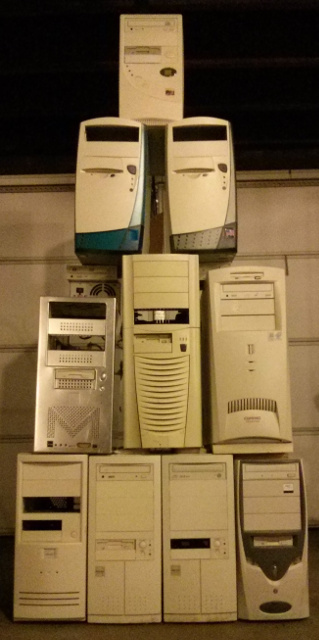
Lord British, those old parallel cables are medieval!
1541 Serial Prejudice
That seemingly-slow 1541 serial bus, though, actually prejudiced me against serial protocols for many years into the 1990s, as the faster drives and printers always used a parallel bus. More lines meant faster speed, right? Well my teen-self had no idea we'd be able to create serial physical and logical protocols to send data so fast today over just one data line (or perhaps two if you count differential signaling↗ ), without corruption. And I had no idea parallel cables would later hit physical limits like clock skew↗ and crosstalk that made them mostly too slow and irrelevant today.
It reminds me of how 8 and 16-bit ADC/DAC audio digitization also prejudiced me against the later and more advanced 1-bit (with oversampling and Sigma-Delta modulation), a similar situation. Higher-resolution graphic bitmaps, too, were hard for me to shrug off when outline fonts↗ appeared that had no resolution limit. What is this, I thought? So you define a graphic by using lines and curves rather than a grid of pixels? Since I had mostly skipped over the vector displays of the 70s (except for my brief, earliest encounters in the arcade), I had learned to see graphics as grids (ironic in those days since the CRT raster beam is natively vector) and morphed into my own raster Max Headroom, but today I use Inkscape and SVG↗ prolifically. (This is a curious linguistic anachronism, too, as the word "morph" wasn't used as a verb until special video graphics software came around in the early 1990s, sort of like generative AI today).
It's no wonder educators wanted us to lift our heads out of BASIC and were frantically pushing Logo's turtle↗ on the youngest kids, as we were becoming a lost cause; it wasn't just a pacifier for kid-simpletons even though it often looked that way to someone walking by that shelled reptile on an Atari Logo screen. I did, however, get my own glimpse of this power myself when I used HesWare Graphics BASIC on the C64 to perform my own form of vector graphics to draw a Jack-o'-lantern for Halloween one year, a program I can't seem to find on any of my disks (nor that BASIC interpreter either--just the manual) and may be lost. Early digital tech placed a screen of pixels over my eyes, and it took a long time for me to detect and yank off that screen.
But I still dream in digital.
The Benchmarks are Astounding
So here are my benchmarks from timing using just a manual stopwatch. I ran both nibread and d64copy on an error-free full disk (that had non-standard tracks 36-41 unformatted), also including my head-bump removal version, and this was how long they each took from the time I pressed Enter to the time it returned the cursor, in descending order:
- d64copy -t original: 9 minutes, 5 seconds (serial, 35 tracks)
- d64copy -t serial1: 2 minutes, 34 seconds (serial, 35 tracks, with fastload routine)
- d64copy -t serial2: 1 minute, 20 seconds (serial, 35 tracks, with fastload routine)
- d64copy -t parallel: 30 seconds (parallel, 35 tracks)
- nibread: 27 seconds (parallel, 41 tracks, nibble copy)
- nibread2: 24 seconds (parallel, 41 tracks, nibble copy, without head-bump)
- nibread -I (on second run): 18 seconds (parallel, 40 tracks, nibble copy, without head-bump, interactive)
- nibread -I -E35 (on second run): 12 seconds (parallel, 35 tracks, nibble copy, without head-bump, interactive)
Did you read that last one? 12 seconds!
A quick calculation of the data rate for 683 blocks x 256 bytes = 174,848 bytes, and if you divide that by 12 seconds, you get approximately 14,571 bytes per second! Note that even the Apple Disk II in practice could not reach that in a typical load (host-side DOS software limitations) even though it could do over 15,000 bytes/sec. Now compare that to the first original d64copy read that was 9 minutes 5 seconds, and you get 320 bytes/second. This is close to what one would see in 1541 stock ROM yet it's a bit lower than the oft-quoted rate of between 400 and 500, and I'm not exactly sure why. Perhaps it's some inefficiencies in the d64copy setup or block re-reads on my old disk, but I don't think block fragmentation would slow down a whole disk copy.
Now consider the enormity of this achievement and what it means. Since 14,571/320 = 45.5, I've roughly measured a speedup of over 45x! The first time you run interactive mode, it detects the drive type, does that head bump and sends that new parallel code over to the 1541 RAM and runs it, which changes the routine to tell the VIA to place the bits on those parallel lines instead of serialize the data. But the second time you press Enter in interactive mode, it doesn't have to do all of that (since it is pre-loaded and ready) and just asks the drive to start reading and sending those bits, and then these parallel data lines are read by the much faster ATmega32U2 on the XoomFloppy which sends it over the much faster USB serial bus to the much faster Linux PC host and filesystem to save the data to a .nib file. The interactive mode even nicely increments the number for the root filename so they don't overwrite each other but seems to loop around when it reaches 9 and doesn't go into the double-digits. It reminds me of that two drive mode in Fast Hack'em 4.1a that operated purely inside the 1541 drives, but this is still many times faster.
In the early 1980s, a full-disk nibble copy on a single 1541 drive may take 45 minutes, depending on the software, taking into consideration the single-drive disk swapping since the C64 can't store the entire 170K (or more) disk in memory. And even then, it still might not work. I can't tell you how many weeks of my life I spent hunched over my single drive, watching the slow progress, waiting to swap disks, unless I was lucky enough for my friends to bring their drive over as a second one for a late-night copy session. In this case here, there is only one 1541, and the PC is acting as a hyper-powered second one.
But comparing that 4-decade-old, single-drive experience to this (where most copies do work) is a 225x speed-up! Yet the drive mechanism and data are unchanged; it still spins at 300 RPM and the blocks are the same.
The Oxide Desert Past Track 35
If you copy all 41 tracks for copy-protection that uses them, at 18 seconds per disk, it's still a 150x speedup or faster. Interestingly, Wozniak first used a Shugart mechanism (that was stripped down and he rebuilt the controller) that was mechanically limited to industry-standard 35 tracks (technically Woz used a 0-indexed scheme and calls track 35 track 34). This leaves 560 sectors, or 140K, usable, less than the Commodore's 170K for the 1540/1541, but still much higher than the FM-based single-density drives at the time, which were around 90K like the later Atari 810 drive (although the 810 did indeed use all 40 tracks natively and was faster than the stock 1541).
Commodore did something similar to Woz and stuck with the standard 35 tracks, even though their ALPS and Newtronics steppers could freely move the head to span the full media and go all the way to track 40 near the center of the disk (technically it can go to track 42, which the modern .g64 format can store, but this can lock up the head). When Apple switched to this ALPS mechanism, it could then move to those higher tracks, too, but they didn't do this, and from what I've read about both Apple Disk II and the 1540/1541 is that they wanted to remain compatible with older formats/drives (although the PET disks were not fully compatible in the end) and their drive mechanisms at the time were seen as not quite reliable enough for them yet. And since tracks higher than 35 were outside of the design goals of both Apple Disk II and Commodore 1540/1541 at the time, they would have no reason to enforce any reliability in this no man's land, a place where the tolerances are tighter at the higher bit density, where the head is at the farthest point away from that dead-reckoning calibration end stop at the other side of the disk, and where the disk is clamped and driven, potentially warping the BoPET film nearby--all of this allowing potential for more error. Tracks 36 and above were a desert for which one had to be well-prepared to successfully cross...
Since Apple Disk II uses a constant data rate (250,000 bps, 1 bit for every 4 clock cycles on the 1 MHz 6502) and a constant 300 RPM speed, the circumference at those highest tracks is small and the speed slow but the bit density and magnetic flux transitions are still within the tolerance of the oxide media at track 40. Apple uses 16-sectors-per track for every track.
Note that the idea of single and double-density 5 1/4 disks is confusing, as this was simply a certification with no change to the disk itself (they have the same oxide layer, the density is what the drive head does to it), and 40 years ago, I strictly used double-density disks with brands like Memorex, Albinar, Scotch, Verbatim, Wabash Pinnacle, and generic ones, although I have known others to use older single-density Elephant Memory Systems brand disks. Similarly, a single-sided disk is also double-sided--again, another practically-meaningless certification for frugal kids like myself, since you can do the hole-punch thing on the edge of the disk and use the other side. High-Density, though, is very different and will not work.
Now check this out: the 1541 on paper should fare better, since it does not normally have to worry about data density in this way, having a relatively uniform physical density. Woz, however, designed his to read and write at constant speed and so the physical density naturally changes. So if you are at the edge of the disk, with large circumference with it spinning faster (higher linear velocity), the bit density is lower, but when you get near the center where it is moving slower, the bit density is higher.
Zone Bit Recording
But Commodore did not do this with the 1540/1541 and used Zone Bit Recording↗ that changes the data rate as the circumference changes, allowing higher and more-uniform density (and capacity) and higher datarates at the outer tracks, similar to how CAV↗ (constant angular velocity) PC optical drives work, unlike the CLV drives whose spindle motor physically speeds up and slows down and makes the PC case whir and rattle. The data rate was not smoothly constant, like a CVT transmission in a car, but was "zone constant" and stepped, like a 4-speed automatic transmission. However, you won't normally see a drastic difference in the original load or copy rate due to this data rate fluctuation in normal use from track to track, since it's mostly throttled by that slow serial implementation anyway. Some people say the 1541 has "variable density", but what they mean is the "recording density" (as the disk spins), what I call the data rate, not the density of the bits on the disk itself (which is relatively uniform, unlike Apple's).
So you would think that tracks past 35 would be ideal for Commodore as compared to Apple, but there was a hardware limit of a generic logic chip whose clock speed could not be divided any further to slow it down; it had no 5th gear. So when going past track 35 into this 5th zone, it uses the the same data rate that it used in the previous zone, which just happens to be the same 250,000 bps that Apple used throughout for its 16-sector-per track layout. You still have differences in GCR, as Commodore stuck with 4-to-5 instead of Wozniak's 6-and-2, and differences in the number of sectors in those tracks (Commodore crams in 17 tracks in that speed zone instead of 16), and other differences. If that 1540/1541 could have slowed down that 5th zone like it did for other zones, and lower it to 16, this would have made track 40 easier to handle.
Many companies did manage to successfully use those tracks by rewriting those drive routines and using less than 17 sectors per track in that 5th zone, but I don't believe they could slow down the data rate in that zone, being a hardware constraint. But if they didn't do this and went ahead and used all 40 tracks with those unreliable 17 sectors in that last zone, the disk would now have 768 usable sectors instead of 683, which is 196,608 bytes, or 192K, gaining another 22K. Some companies managed to do just this by relying on the fact that the higher quality disks often had a higher tolerance than the manufacturer reported, similar to the single-sided, single-density situation where they were really double-sided, double-density ones in disguise. In some ways it reminds me of MicroSD cards and SSDs today and how it's difficult to rely on the manufacturer's reported speeds rather than actual real-world benchmarks.
By the way, when I use capital K here, I mean Kibi or Ki, not Kilo, but back then we didn't even have this unit, and K for computers simply meant the closest binary power of two to 1000, or 1024, a habit many of us older computer users still do today, as Kibi just sounds strange. But "floppy" probably sounds pretty strange to younger people today, so I have no right to complain. Humorously, Kibi became an IEEE standard in 2002 under IEEE 1541↗, with no relation to that famous Commodore drive model ...or so they say!
Jokes aside, if you're former C64 and 1541 user, you'd agree with me that this XoomFloppy parallel 45x speedup over stock ROM is incredible. Again, that 1541 drive spindle motor is still spinning at that same 300 RPM; this has not changed.
Copy, Convert, Test, and Repeat
So my process was:
- Run nibread -D9 -I mydisk.nib Copy disks in interactive mode (or use my nibread2 -I if I want to make sure I don't get an initial head bump on the first run)
- Run nibconv mydisk1.nib name_of_my_disk.g64 in another shell and then increment the number as needed and type in the name for each disk. This only takes a fraction of a second to run.
- Test each .g64 disk in VICE emulator to ensure it works
However, if I found that no errors at all were detected in the copy and the tracks after 35 were just unformatted (which would be the norm), then I assumed no copy-protection was at work and ran nibconv name_of_my_disk.g64 name_of_my_disk.d64. This converted to .d64 which is smaller and does not require a nibble copier. But this .d64 did not work all of the time; sometimes it looked like an error-free copy, yet only the .g64 would work and not the .d64, as hidden copy-protection was likely still present, so I had to test each disk in VICE thoroughly before deciding to finally delete that .g64 file.
The Art of Load and Start
I did come across only a few games that would not work. It's weird when you copy copy-protected disks with errors, as you can't always tell if the errors are an intentional signature or a real error due to degradation. It becomes a true art, and you see certain patterns on the tracks and blocks that look non-random, then when you load the game in VICE the head goes all over the place in strange patterns (a sign of copy protection). You fall into a trance and sink into a deep, dark pool of signal analysis...
In other cases, you'll see a disk with no errors, but then a weird one on just one block, or errors that correct after re-reads--this is likely degradation or a dirty head. When I see a slew of errors (no pun intended) across all tracks that grow and grow as the track number increases, I assume it is going out of alignment and that I need to force some head-bumps. It made me realize that all of those years when I copied disks as a teenager with nibblers, I had little idea some block errors were creeping in since the copier didn't care and the game still worked. And it's frustrating when you get to a certain advanced level in a game or insert disk 2 just to find out that you get a CPU jam, flashing drive light, or garbled graphics. The whole disk or two-disk games are the most prone to failure since they had the largest exposure to error, covering more blocks (and the copy protection also makes them fragile if one of its critical blocks gets corrupted), with many of the smaller file-based games escaping the areas on the disk that had errors. Sometimes the drive would enter an infinite loop, as if its linked list type of structure (where each block points to another block) was referring back to the same blocks.
You can also get errors in the BAM (Block Availability Map) which was essentially a block whose bits tracked the status of other blocks. Its "file system" was very rudimentary as we understand it today and had no such thing as "directories". Back then, the word directory (like the MS-DOS "DIR" command) as used with home computers was more often referring to a command to list files (nicely stored in track 18 in the middle of the disk on the 1541 for faster access, with a 144 file limit) than to denote a "folder" for more files (subdirectories), as the "directory" was simply your singular list of files. The first time I ever read a directory was when I typed in CATALOG on my neighbor's Apple II+, a word that still has fond hunt-and-peck memories for me, as I didn't know how to touch-type back then. I remember using hex editors and disassemblers in the old days to examine each block, often examining their ASCII representation for hidden strings or changing the text and parameters in software, similar to the flash memory modifications I did on the UV-5RA radio firmware using Linux hexdump in my more recent TRILLSAT-1 prototype.
Running this software through VICE is fascinating too, especially with the 1541 sounds on, as it displays what track is being read, and you can watch it fly all over the disk in strange ways, bump the head (in simulation, of course), flash an error light and then stop spinning for a few seconds before it starts reading again. Again, these are signs of copy protection at work since it is checking to see what kind of expected, intentional error occurred before proceeding. I've read that Apple II disks had all kinds of creative copy-protection schemes as well. It is fun watching this in simulation and not having to wince knowing that it's not a real drive getting abused. Once the data is copied to my Linux PC, the real 1541 can rest and I can then rely on either VICE or the Pi1541 to emulate it with cycle accuracy.
Knowing how to start a game, too, is an art and is often a process of finding the right key or joystick button sequence, as on-screen instructions or standards were not as common, and each paper instruction book (if you were lucky or wealthy enough to have one) was different. Like Linux and Unix, there were a lot of common conventions that you had to just try out, since few rules were rigid or consistent.
And loading the game is a similar art, as you have to find the correct loader executable, or use "*", and sometimes you have to load into BASIC first by leaving off the ,1 at the end before typing RUN when it then jumps into a machine language routine. So testing each game can be tedious, but this is muscle memory for us Commodorians! After copying disk, loading game, testing game, copying disk, loading game, etc., I was soon flying through those permutations again. I spent literal months of my life doing this as a teen, with far slower equipment.
The occasionally head-banging with nibread did seem to throw my drive head out of alignment a few times, but if I ran it about 5 more times, the banging seemed to force it to cycle around and start working again, reinforcing my theory that the ALPS mechanism is slipping on its shaft. I've thought about using some Loctite 609 retaining compound on it to try to halt the slipping once I get it back into alignment. But this is just a minor hassle while copying, and my nibread2 made this less likely. Now that everything is in VICE, this won't be an issue anymore! Huzzah!
Transwarp: A Fastloader from Another Universe
Trying to speed up the conversion of data from the drive, through the serial port, and back into the C64 is not unlike the tradeoffs one might encounter in Linux when, say, using rsync to transfer files using a slow computer and slow link, experimenting with server vs. client-side compression, as you have to find the optimum balance of processing and throughput. I have an Epyx Fast Load cartridge↗ (a software routine that can load at around 2.5KB/s, a 5x speedup) and also used many machine language (assembly) fast loaders, even disassembling and stripping one out so that I could call it from my own program, but they varied in their speeds. In 2020, however, Krill of Plush of the C64 demoscene created a mind-blowing fastloader called Transwarp which is a bit esoteric with its non-standard format, yet still a software-based loader that shows what the 1541 serial could have been. Transwarp loading a disk using a stock C64 and a single 1541 drive over the serial cable is 50x times faster, up to 19KB/second, even faster than both my 12-second XoomFloppy parallel and faster than the Apple Disk II max hardware bitrate. But it can't save files as fast, so it can't copy them to another 1541 as fast (it's just a fastloader).
Woz Made His Drive with the Old Magic
As mentioned earlier, the Apple Disk II was a very fast drive at the time around 15KB/second, the fastest stock 5 1/4 inch drive out of any 6502 based US home computer in the 1980s, over 30x faster than the C64, the slowest. Note that this comparison is just the drives themselves, what they can push out to the computer, but in actual use the Apple DOS (which ran on the Apple II, not the drive like the 1541) was a limitation that made the Apple loads closer to 2KB/sec in the early days, which was still over 5x faster than that stock 1541 ROM, but Apple's ProDOS later increased this to around 8KB/sec, and later software sped this up further. For example, Apple Copy II Plus is said to have been able to copy a disk in less than 20 seconds, and Locksmith 6.0 in 16 seconds, almost as fast as my 12-second setup. This is more amazing when you consider that, in a dual-drive setup, the Apple II would still have just a single CPU managing that transfer between them, when the C64 now has three. And around 2020, qkumba (of the Apple II demoscene) released Qboot↗ fastloader that can read at 16.2 KB/s and apparently reach Woz's hardware limit.
So "technically" Apple's minimalist drive was indeed 30x faster than the 1541, but not if you consider both the computer and drive as one unit, so it's a bit of a linguistic division based on where that DOS is located. If you rewrite your DOS for an Apple II to speed up the transfer, for example, that's essentially the same as rewriting both the 1541 ROM (in RAM) and the associated ML routines on the C64 side. Commodore made the comparison fuzzy with their smart drive, conflating it further with their serial cable, but today, we often think of a computer (like a laptop, smartphone, or Raspberry Pi with onboard MicroSD) as including its own non-volatile storage, but in those days, the "computer" was often seen as separate from the disk drive, even considered separate from the TV or monitor or keyboard. When I first got my TI-99/4A computer and connected it to my TV, for example, I lost my BASIC program every time I turned off the power switch and begged my parents to drive me to JC Penney to get a portable cassette recorder so I could save them first. If we want to be pedantic, the computer is just the CPU and memory, a (finite) Universal Turing Machine, but most would not call it such. This is the same problem technology benchmarks have today, trying to compare two things that have many categorically-different subcategories, like comparing the speed of two CPUs yet not taking into consideration that that software was optimized to just one CPU's architecture or instructions.
From my understanding, the theoretical max of that 1541 is actually higher than Wozniak's masterpiece due to that ZBR, its format, and the fact that Commodore's GCR scheme had a higher encoding efficiency, but Woz's scheme was optimized for both cost and speed. I want to clarify though, that what Woz did with just a few logic chips was amazing, and he did it very early on, in 1978, years before Commodore 1540 or Atari 810 consumer floppy drives even existed, and he did not have access to custom chips like Commodore that owned MOS Technology and brute-forced their way in. The way he broke convention and optimized his design so early on was beautiful, and I get more impressed the more I study it. It still held up over the years, and he was able to improve his GCR (which allowed 16 tracks instead of 13) by simply replacing the PROM chip in the controller card. By the way, this name confused me as a teen, as I thought MOS was in reference to Metal Oxide Semiconductor, the type of static-sensitive MOSFET transistors that made up the bulk of the chips, not the company name itself. Apple was not as confusing since there were obviously no edible apples on their circuit boards... Woz did it with just one 6502 CPU in total, not two like Commodore (or even three with its earlier PET and 2040), and Commodore actually sold the MOS 6502 to competing Apple in the early days (but Apple later bought most 6502's from Synertek or Rockwell that had a cross-licensing agreement). Woz redefined how a consumer floppy drive could work and made it easier for everyone that followed. He is quoted as saying:
"The disk design was my most incredible experience at Apple and the finest job I did."
He continued later:
"During that three years there were two main factors that led to our success – our floppy disk and VisiCalc".
I agree that the slow speed of that 1541 would have most certainly scared away business (and school) use of the VIC-20 and C64 and left them primarily to the games market, and the fact that the copy-protection and fastloader schemes (in 1541 RAM) were so complex and different from game to game didn't help and meant that Commodore could not easily switch to new drives in the future. The burst mode on the later 1571 finally took advantage of that CIA shift register (yeah!), yet it sadly arrived too late and was only for the C128. The C64 had to survive on its own without ever meeting its lost CIA partner, which had since become a Saint that only passed blessings to the 128.
And the 1571 could only use the other disk side without manual flipping if it was formatted specifically for the C128, since it spun in the opposite direction from inverted (flipped) C64 disks. Interestingly, the 1571 included both CIA and the older VIAs, even switching back to those slow ROM serial routines when using the C64 and VIC-20 to remain compatible. It also added that old MFM back in for CP/M compatibility, added an optical end stop (finally), and added an optical sensor to use that index hole again (which is now possible in this true double-sided arrangement).
I could not afford a 1571 in 1985/1986 and kept using my slower Newtronics 1541, but even if I could, there were hardly any games that took advantage of the C128 side with 128K. Other than its great BASIC 7.0, it was this fact, along with the fact that most of the machine's hardware (especially the CP/M Z80 side) was useless to me, that caused me to get rid of that C128 as a teen and stick with the trusty C64. The Commodore 128 was a beautiful but underappreciated 8-bit triple-computer released during the Amiga era.
However, that 8-bit 5K VIC-20 is probably the primary reason that the TI abandoned its mostly-educational 16K TI-99/4A with the 64K Commodore 64 being the last straw, announcing its discontinuation in October 1983. The TI offered a 90K PHP1850 External Disk Memory Drive that could be paired with a PHP1800 sidecar controller card and was faster than a 1540, but they were pricey and made it closer to the price of an Apple II system. The TI-99/4A was my first computer (that I used with a meager JC Penney cassette drive) that I received around age 13 in December of 1982 (if I remember correctly) as a gift from my grandparents, and this sudden news less than a year later was crushing, as official cartridge production also stopped shortly thereafter. But I didn't care at that point, as just a few minutes with my other neighbor's new C64 (like Spielberg's films, I grew up in a subdivision full of kids around my age) combined with some chalkboard chats I had after class with a new high-school teammate where he showed me how easy and free C64 ML programming was, made me realize just how poorly designed that frustrating TI was.
When I first played the C64 Ghostbusters at my neighbor's house and heard that digitized voice and synthesized SID music (the SID chip could also synthesize voice, by the way, without needing an external speech synthesizer, like TI), saw how fast its BASIC interpreter was, and saw the gigantic software ecosystem which was mainly disk-based instead of cartridge, that was all I needed to see. The TI had good chips and was much more powerful than the VIC-20, even faster than the 1 MHz 8-bit C64 on paper (and TI still produces excellent chips today), but made poor use of them in that machine. That 16-bit TI-99/4A (yes, it was 16 bits!) in practical use was crippled by its 8-bit data bus, massively slow BASIC interpreter (double-interpreted), slow CPU access to RAM through the video chip, using 32 instead of 40-column mode, and lack of software, access, and information to use ML programming. The 5K RAM of the VIC-20 was not as much of a limitation as is seems, though, since most of its software was provided on cartridge ROM that increased the usable program storage.
The electrical IEC serial bus signaling on the VIC-20 and C64, too, can hit a much higher rate than the software or drive mechanism can even reach, so, again, Commodore's serial cable was not really the bottleneck. It was just that the two 6502 and/or 6510 CPUs on both ends, the same fundamental CPU as that Apple II, were overworked and could not keep up with the processing of the bits (just like a poorly-written serialization function would do if you ran it on a slow PC in interpreted Python without a C library).
I Realized That I Already Built My Own “Disk Drive”
I actually ran into this very issue myself on modern equipment when designing my torque-streaming motor speed control system for TRILLSAT-1, including creating my own speed controller for a BLDC motor I pulled out of an old DVD+-RW drive (an optical disk drive). I was hitting the limits of the 8-bit ATtiny1634 timers, dividers and interrupts (just like that 8-bit C64 often did), and I2C speed, in combination with Python to keep up with the speed of two rotating motors as I streamed real-time torque data over I2C to one of them; it's amazing how fast data from a rotating disk can be flung when you increase that mechanical speed (especially if you have 3 sensors per rotation), which is why those ubiquitous 7200 RPM 3.5 inch hard drives (along with high areal density) are still useful in this era of NVMe SSDs.
So I already designed a sort of crude "disk drive" into TRILLSAT-1 without knowing it. I don't have a brushed DC spindle and stepper motor, but I have a brushed DC "planetary" drive motor and BLDC gyrofan, which are driven in similar ways. I don't have sectors, I have sextants. I don't read magnetic flux from iron oxide using a R/W head on a spinning floppy, but I do indeed read magnetic flux via permanent magnets using 3 Hall-effect sensors and 2 Hall-effect switches, some going through an LM339 quad comparator, driven by both my custom MOSFET H-bridge and an L6234 3-Phase Motor Driver IC. I designed these two motor controllers from scratch along with my own internal "DOS", so to speak, and it's all contained inside a "smart" system like the 1541, via the ATtiny1634 called Sawyer, although my torque math pre-generation is done on the Pi Zero W. This ATtiny running C could be thought of as that 6502 in that 1541, and the ARMv6 CPU in the Pi Zero W running Python could be thought of as the C64 host computer running BASIC. One of my project goals was to use as few and inexpensive parts as possible (just like those early consumer drive designers did), the minimum number of sensors, and overlap, overload, and maximize what I had. The Sawyer motor controller MCU can also receive haptic commands over a daisy-chained, Morse-code data bus I created using an algorithm I call SIMTHEO SHH in which I even created my own type of GCR for Morse-code-encoded letters that end in DAH, the 7 letters MOWTAUK, using 1 extra bit to ensure it could be reliably recognized.
I haven't released version 1.2 of my control software yet, which has the most advanced features and bug fixes, but plan to do so soon, as it's really fascinating.
Note that my planetary drive motor is a type of CLV and my gyro is CAV; these are two different types of motor drive systems, and their motions are more complex than a floppy disk drive.
What Was, What Could Have Been, and What Can Be
So, today, I can now better appreciate what those engineers had done back then, something I wouldn't have quite been able to comprehend as a teenager, even though I had almost put all of the pieces together with my phone system and my mobile robot interface, was stripping out ML fastloaders, and was editing disk sectors with a hex editor. In my C64 Phone System for example, I used the very predecessor of the 6522 VIA, two 6520 PIA↗ chips, but I used the compatible Motorola and AMI 6821 chips designed for the Motorola 6800 (since they were the only ones I could get at my local electronics store) rather than the original MOS 6520 designed for the MOS 6502 and used in the Commodore PET (their histories are intertwined).
You can see a photo of them here that I socketed to my PCB which I interfaced into the C64 cartridge port when I was around 21 or 22 years old in 1991/1992. Those chips then allowed me to convert that "addressable" port into controllable, general-purpose I/O lines (a GPIO) to control my phone system logic.
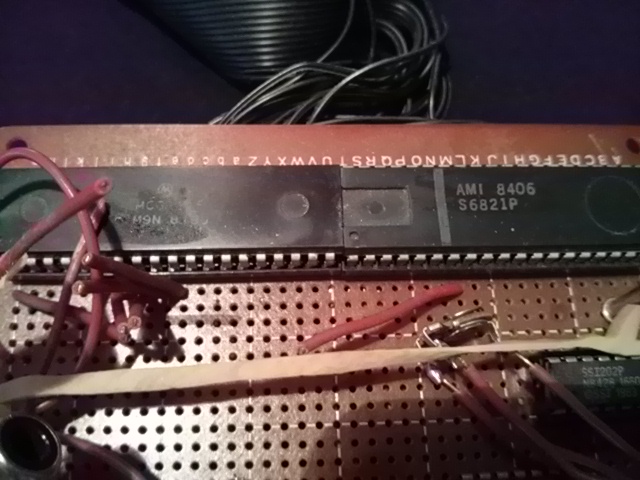
But for the C64 and 1541, since the CPUs were not fast enough for the speeds needed, other than tapping into the VIA chip directly and fetching all 8 bits at once like parallel hardware mods do, those software fastloaders and even d64copy serial modes also rewrote the routines in that drive ROM in RAM--not to tell the VIA to send parallel bits for the XoomFloppy, but to use more optimized routines for the serial bus.
It's so sad the drive speed was crippled. Like that TI BASIC, the poor quality serialization/de-serialization for the 1540 and 1541 meant that it was sort of double-interpreted, too, if you think about it.
In the 1980s it was an adventure just to copy the game and get it to load, and by the time you did that you might have run of of time or been too tired to play the game itself. VICE↗ is so fast that I can finally take the time to see what those programmers did, and the Internet now allows us to access the instructions for them, too, things that were so difficult to obtain in those old days unless you owned/copied the paper booklets or downloaded text files from BBSes. My grandfather used to read WWII history books near the end of his life, long past the war in which he served, learning things about it that he didn't know. Similarly, I now enjoy reading the behind-the-scenes history of what actually happened in those old days, events of which I was not a part (nor able to fully comprehend until I gained more technical knowledge). I would have been the same age he was in WWII, although I was typing on a Commodore 64, not stationed on army bases or sailing through the Pacific.
I'm glad the VICE emulator recreates the floppy drive sounds and LED, since, by simulating the "loading" of the game from 1541 floppy disk into memory via the emulator, you do get some of that experience as opposed to just taking a snapshot of the running emulator state and memory in VICE (assuming the whole thing fits in memory and does not require further disk access) which acts more like an instantaneous cartridge when you reload it but is not guaranteed to work with future versions, unlike the more dependable .d64 and .g64 formats. But I am a bit sad that the C64 Ultimate team recreated a physical C64 nicely (even includes Robert Russell's signature on the white mainboard, among others) yet did not do the same for the disk drives, although they did incorporate sockets for non-volatile MicroSD and USB flash storage. This is understandable, since the 5 1/4 inch floppy is considered obsolete today, and the media is no longer being manufactured. But record players (turntables) were also said to have been made obsolete by the CD-ROM, film cameras by digital ones, yet vinyl records, turntables, film cameras, film and film processing are still around in some form. So if they made a new 1541 with optical end stop sensors that could be toggled on, then we'd all be able to read those old disks without worrying about our Newtronic heads corroding, our ALPS heads getting misaligned, or having to find and fix used drives on eBay.
Note that those Newtronics 1541 drives with the bad heads can be somewhat "fixed" by swapping out the Newtronics mechanism with a similar ALPS mechanism inside certain Apple II drives like the UniDisk or even swap out the ALPS from another 1541, but both require cannibalizing another drive, resoldering some wires/connectors, and, of course, it changes the external appearance of the drive. I've read reports from some that say that if just one of the two Newtronics coils is bad, the read or the write, that a resistor can be added to bypass one coil, and the remaining coil can be repurposed as a read head, but it won't be a fully-functioning drive, and if both heads are corroded, it won't read anything at all.
By the way, I know those Apple drives well since, before I even owned a computer, at age 11 or 12 in 1981/1982, I first used my neighbor's dual Apple II+ Disk II that his father owned as his home office computer on which--when he was away at work--we would boot up the DOS and/or load disks of Apple Galaxian, Choplifter, Castle Wolfenstein, Mystery House, Mystery Fun House, Epoch, David's Midnight Magic, Flight Simulator, Lode Runner, Eamon, Ultima, and the gigantic Time Zone, the Proust of all adventure games at the time and the last game I can briefly remember playing with him before he moved away (his father got an IBM PC around the same time), just before I entered my first year of high school.
Again, there are hardly any chips on the Apple Disk II Controller Card (one of Woz's great achievements), and unlike the 1541, there is no giant transformer or internal power supply inside the drive itself since it did not have to power those multiple large chips and CPU and simply got its power over the parallel cable from the Apple II+ itself. It's also a good thing Apple drives were fast since they had to use that drive to boot to DOS anytime you turned on the computer, unlike the C64. Remember, these were the days before an actual OS that would remain persistent and load many programs into memory, so you had to reboot it anytime you wanted to play a different game (which was often).
The Apple drive's head-banging sound is also slower, quieter, and less violent than the 1541; this is because Woz originally pulsed their stepper motors at a much slower rate, causing the head carriage to move more slowly and not slam into that end stop as hard. C64 users have fond memories of our drive sound when we hear it in VICE, and I'm sure past Apple users do for their drive sound as well, for both the Shugart and the ALPS mechanisms.
Note that I haven't really mentioned Atari much in this article, who also made their own 6502-based computers that were right there alongside us in those days. After our family's Atari 2600, I rarely encountered an actual Atari computer but just admired their ecosystem and culture from afar, as we were both fighting the good fight against Apple (whose graphics and sound were inferior, yet remained more popular in schools).
One kid in my neighborhood had an Atari 400 in which his father (an engineer that designed backup computers on the Space Shuttle) soldered RAM chips into it, and that was the first time I saw the game The Pharaoh's Curse, one of my favorite games, a port of which I later played on the C64. He did not own a disk drive, only a cassette, but that Atari 410 Program Recorder cassette loader was more amazing than my TI-99/4A, since as that game loaded, the computer would entertain you on the TV while you waited and was not just a static load or blank screen, although I cannot find any Youtube videos of anyone loading this game from tape to confirm, but this is what I remember.
My cousin had one of the later Atari XLs (I think it was the 800XL), something I coveted before I got my C64. But after I got my C64 (and briefly a C128), on May 8th, 1987, one of my friends suddenly gave me their old Atari 400 with a 410 Program Recorder after he got an Apple IIe (I often accumulated old computers when others thought they were obsolete). I thought it was a bad decision, as the expensive IIe still had inferior gaming graphics and sound compared to that Atari 400; Apple was still riding on their older architecture and their floppy disk drive was still superior (by the way, I don't recall the term "gaming" or "gamer" being used like this until the late 1990s). This was my first chance to be an Atari user, but I was so heavily involved with the C64 and 1541 (and had no Atari cassette software) that I had no use for it either and gave it away as well. But even when I got my Amiga 500 in the 1990s, I still kept an eye on that Atari ST, as the Ataris had a magical feeling to me.
My next archival project will be to get all of my old Amiga 500 3 1/2 inch floppies copied in the same way, but that's less of an issue since I didn't program anything for the Amiga, yet I did write papers and create illustrations that I would like to recover. From what I can tell, Amiga disks can be read with old PC floppy drives (which I have), but only if you use a special interface like a Greaseweazle↗, as you cannot simply read them with the drive connected directly to a PC (although the Amiga can read PC disks if they're double-density--not high-density--and if custom software is used). Then I will likely move on to my old PC floppies, working from the oldest magnetic media to the newest.
Freespin: What is a Home Computer Anyway?
When I started this project in 2025 and made my first attempts to read those old disks (and failed), I had just wanted to retrieve that old data, not caring about that 1541 itself, as the C64 experience was what really mattered to me. But after completing this adventure and now getting ready to store that drive away, I realized that the 1541 and the process of loading and copying disks made up so much of that experience that I had forgotten that it now feels empty without it. As I mentioned earlier, the Commodore 64 unit itself, a home computer, is not really a complete desktop computer (a computer system) as we think of it today since it lacks non-volatile storage and a monitor with speakers (and networking for that matter, unless you count its software UART); it's mainly the CPU, memory, and custom graphics/sound chips (and of course those CIAs), as if you took a Raspberry Pi 400↗ (a 2020 design that was inspired by those older home computers of the 1980s) and only booted the Linux kernel from a read-only /boot partition on the MicroSD flash, and disabled the WiFi and Ethernet.
The 1540 and 1541, though, have their own 6502 CPU and don't even need the VIC-20 or C64 unless they want to load something in their RAM, a curious reversal when the disk drive becomes the computer and the computer the disk drive, which, since it already has non-volatile memory, could arguably be considered a truer form of a "personal" computer until you realize that those drives also require a keyboard, monitor, and speakers to fully become one, although they can actually vibrate their stepper and become their own speakers to create audible music (and there were demos that did this back in the 1980s, one of which I still have). Of course, the Commodore 64 is so named because it has the all-important 64K--ample memory that distinguishes it from the VIC-20 and earlier home computers--yet those drives only have 2K which is anemic, more inline with the Timex Sinclair 1000 (a tour de force of cost-cutting which didn't even have sound, but had B&W graphics). But in 2021, Quiss of Reflex (of the C64 demoscene) created the Freespin program for the C64 that, once loaded into the 1541, will play sounds through its stepper and also bitbang a video signal to display crude graphics to a monitor through its serial port. Amazing.
The Language of the 8-Bit Bumble Bees
While nearing the end of this project page, I saw another story in the news on bumblebee intelligence↗, that an individual bumble bee with its tiny brain can still do some of the same problem solving tasks that only chimpanzees, elephants, and some birds can do. How is this possible? Perhaps the answer is found in those paragraphs above; when the collective of humanity, in hindsight, learns what they could have done on that C64 and 1541 drive, there are many individuals that step forward↗ to correct history and be the first to do those very things, which would have been seen as miraculous or impossible in those days. In other words, when we encounter a machine today, while we think we may have mastered and understood it, decades later humanity will have advanced to the point that they now see things in that same hardware that we could not have imagined, as if the Universe is a star field of random pixels until we connect a new pattern between the dots and then recognize it. Like the compound eyes of a bumble bee, there is a screen of grids over our eyes, too (perception).
Those bees have a nest collective, and they communicate with each other, analogous to training a giant LLM on the knowledge created and shared by each of us individuals (to many objections). What if each bee, when it flies away from the nest, takes something like a highly-quantized tiny LLM along with it, a memory structure shaped by this nest? Then all it then needs to do is perform "inference", so to speak, analogous to running a local version of llama.cpp on a 4 GB Raspberry Pi 400. YTM of Elysium (yet another name in the C64 demoscene) even got one to run on a tiny C64↗ with some modifications. However, bumble bees don't have giant hives like other bees, so their datacenters are quite small. So could they be carrying more on-board memory to compensate?
I'm just speculating, but nevertheless, when you see the software evolution over the years of the C64 (or a Pi, or any fixed hardware platform, for that matter), this analogy shows that, like an artistic movement, the concept of advancement is less about a machine's untapped capabilities and more about our collective condition, a window into ourselves, or even a mirror of ourselves, like those crafty ELIZA-like LLMs. The later, more-advanced C64 games of the 1990s often relied on the advancement of our language of games to appreciate, similar to how someone in the Korean Joseon↗ period would be quite confused using a modern Samsung smartphone, even though it was designed with extreme user-friendliness in mind; they lack a language of the user-interface which goes far beyond the surface of this machine. They may not even live in a way that would give it any utility in the first place, making comprehension of it that much more difficult unless they changed their behavior to give a purpose to a purposeless object. I'm watching the 2026 K-drama My Royal Nemesis as I write this in June 2026, and the main character (transported through time from the Joseon period like many fantasy K-dramas) picked up the smartphone quite well, and her mannerisms became more modern over time as her language of our time developed.
Of course this is fictional, but it reminds me that it shouldn't have been as shocking to me when I saw that the serial Transwarp could beat the XoomFloppy parallel's 12-second disk read, which was already 225 times faster than I remember from my youth, yet it still is. It shouldn't be shocking to me that someone eventually got real-time GCR working on the 1541 or that someone's software program turned the 1541 into a self-contained computer with graphics and sound, but it still is. The language of that serial bus was rewritten in the future. And Woz or Bob, if given the chance today, would surely know of or find ways they could have sped up their old drives if they wanted to do it all over again. Whether shy or gregarious, we social animals are undoubtedly similar to those bumble bees living within a larger nest--those groups, cities, and our communication networks.
Conclusion: The Joy of the Joseon Joystick
But what was most fascinating about doing all of this, and it reminds me of the cathartic time in the 1980s when I used that very C64 to program my own video titler for NTSC video to title our old 8 mm family films as I copied them to VHS video (moving them to DVD-R two decades later), was that the equipment that was so familiar to me as a teenager was almost foreign to me 40 years later... at first. I treated the equipment and disks like fragile artifacts at first, nervous to even touch them, until I started seeing, hearing, and feeling the old patterns of swapping the disks, running the LOAD "$",8 and LIST commands in the VICE emulator along with LOAD "*",8,1 or SYS calls to a specific memory address to test the programs. I even had to remember all of the common permutations of how to launch the software, then I began using AntiMicroX in Wayland-only Ubuntu 26.04 to map ESC, F1, F7, Spacebar, RETURN, RUN-STOP, and RESTORE keys to my 8BitDo Ultimate 2C Wireless (non-Bluetooth) Controller, even creating a macro to type "RUN" and RETURN if needed, also mapping VICE functions like Fullscreen mode, Warp mode, Attach disk image, Pause, and Swap Joysticks so that I could perform most functions for games with just the 8BitDo gamepad, never needing to access the keyboard or mouse, unless it was a keyboard-centric game.
In fact, when I wrote my old software fastboot menu on the C64 almost 40 years ago, I tried to add some similar conveniences, create a system that allowed me to list and launch games from my internal database, numbering each adhesive disk label (or yellow masking tape which I often used) to match that database, even performing a SYS call into an ML fastloader routine that I disassembled and extracted from some 3rd party software (I can't remember which, but I did not write my own). That menu-based loader was one of those precious BASIC programs that I was able to finally copy and save due to this XoomFloppy project. I'm going through my source code now, trying to see exactly what I did. Like that bee inference engine, it was like a Joseon past life or dormant part of my memory suddenly became active again, and the more I worked with this project (hunching over that drive like the old days) the more I remembered. Remembering and reconstructing the context of all of this has redrawn those beautiful constellations within my glittering star field, and like a techno-archeological rediscovery, I can see that pantheon in the sky once again.
I even ordered a modern Hyperkin Trooper 2 USB PC Atari-style joystick (it even looks like one) to replace that advanced, wireless 8BitDo gamepad in many games. It has a lot of play in it, but a classic joystick often feels better in the hands for games designed for them and allows the player to move in certain ways using joystick kinematics and ergonomics rather than a D-pad/analog stick, although in some games, the latter is superior. Yet in others, the only wise choice is to invent your own.
Transwarp, Freespin, VICE, XoomFloppy, Pi1541, Trooper 2, C64 Ultimate...
The bitmapped world of only 8 directions is still out there and asking why you left.
Comments